An .exe file is the format Windows uses to run programs. To create an .exe program without programming you have three realistic options: converters that wrap a website or file in a window, no-code builders (a few of which support the desktop), and AI builders that turn a description into an installer. In Fanann's Windows Studio you describe the program, try it in a window, and download a real .exe installer for 64-bit Windows 10 and 11.
- how to create an exe program without coding
- how to make an exe file
- can I make an exe without programming
- turn my idea into an exe program
- difference between exe and installer
- exe maker without code
What is an .exe file, in plain words?
An .exe file is an executable. When you double-click it, no other program opens it the way Word opens a document or a viewer opens a photo. It runs by itself. Every program you know on Windows, from the calculator to the accounting software in a shop, starts from a file with this extension.
The word is used for two different things, though, and mixing them up causes half the questions:
- The program itself
- An .exe that runs when opened, with helper files beside it
- The installer
- One .exe that puts the program in place and adds it to the Start menu
- What you hand to people
- The installer, not the program folder
- Where it runs
- Windows only. Not Mac, not phones
So when someone says 'I want to make an exe program', they usually mean: I want something I can send to a person, who double-clicks it, and it installs and works. That is exactly an installer. For the wider map of ways to make software, see how to make a Windows app.
Can I create an .exe without writing code?
Yes, in three ways that differ a lot in what you end up with:
| Method | What you get | Its limits |
|---|---|---|
| A converter that wraps a site or file | A window showing your website or Excel file with its own icon | Not standalone software; usually needs internet and does not print or save like a real program |
| A no-code builder | An app you assemble by drag and drop | Most target web and mobile; few produce a Windows file |
| An AI builder | Made-to-measure software with an installer | Needs a clear description and serious testing from you |
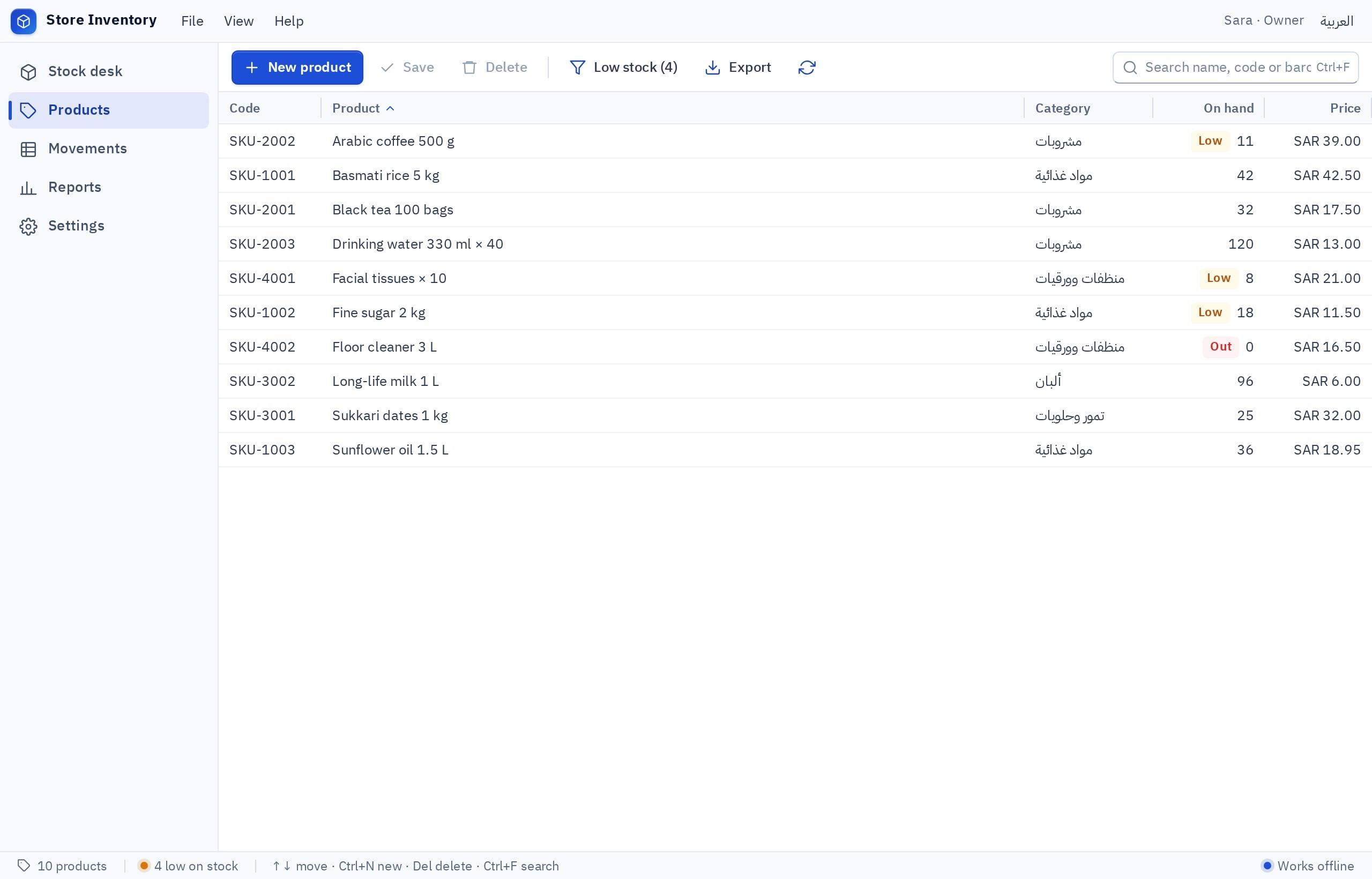
What separates a real program from a shortcut to a website?
Before you pay or put in effort, ask this about any .exe you are offered:
- Stops when the internet drops
- Its data is on the site's server, not your PC
- Prints through the browser and its settings
- No real menus or shortcuts
- If the site closes, the 'program' stops
- Works offline when its data is local
- Its database is on the PC or in a cloud you choose
- Prints straight to Windows printers
- Menus, shortcuts, dense tables
- Keeps working as long as it is installed
That does not make a shortcut bad in every case. If you have a website that works well and all you want is a desktop icon that opens it, a shortcut is enough and you need no program. The trouble starts when a shortcut is sold to you as software that works offline and keeps your data with you.
The practical test is simple: unplug the internet and open the program. If it runs and saves a new record, it is a program. To learn when a website is all you need anyway, read desktop app or web app.
How do I get an .exe for a program I describe in words?
With Fanann's .exe builder you do not start from a file or from code. You start from a sentence:
I want a Windows program in English to track my business expenses as a freelance designer. I record each expense: date, amount, category (subscriptions, equipment, transport, hospitality), payment method and a note, with a photo of the receipt attached. A list of expenses with search and filters by month and category. A monthly report that totals expenses by category and compares with the previous month. Export the report to a file I can send to my accountant. Ctrl+N adds a new expense. It runs on my PC only, with no internet, with backup and restore of the data.
Try it in Fanann- 1Try it in the window
Add real expenses from last month and see whether the report says what you expect.
- 2Confirm where the data lives
For one PC: a local database. For several PCs that see the same records: cloud.
- 3Switch on what the program uses
Printing, files, notifications, backup. Each ability is off until you switch it on.
- 4Set the version number and publisher name
A number such as 1.0.0, and your business name, shown during installation and in the list of installed programs.
- 5Build and download
One installer is prepared, with a fingerprint that identifies it, and you download it on a Windows PC.
What happens when someone double-clicks the file?
It helps to know what the person you send the file to will see, so you can explain in advance:
- 1The file arrives
On a USB stick, a shared folder or a download link. Some email services block .exe attachments, so a shared folder is safer.
- 2They double-click
Installation starts for the current user, with no administrator password.
- 3The program installs
If a small Windows component is missing, the installer adds it. Nothing else needs downloading.
- 4It appears in the Start menu
With your program's name and icon, and it opens like any other program.
- 5First run
With local data it starts with empty records. With cloud data they sign in with their account and find the shared records.
How can the recipient be sure the file is really mine?
A file can pass through several hands and channels before it reaches the person who will install it. There is a simple way to confirm that what arrived is what you built: the file fingerprint. Every installer comes with a SHA-256 fingerprint, a string of letters and digits that changes completely if a single character of the file changes.
- Copy the fingerprint from the program's download page in Fanann.
- Send it to the recipient through a different channel from the file, for example the file in a shared folder and the fingerprint in a message.
- The recipient calculates the fingerprint of the file they received, using Windows itself, and compares.
- If the two match, the file is yours, unchanged on the way.
Calculating the fingerprint needs no extra software. The recipient opens PowerShell from the Start menu and types the command Get-FileHash, a space, and the path to the file; the string appears, ready to compare. The easy way is to paste the two strings on consecutive lines and check that they match in full, not only at the start.
Can I send the program to others, or sell it?
You can install your program on any number of PCs and hand it to your team. If you are thinking of selling it to other shops, check a few things before you promise anything:
For the commercial side, from pricing to support, read how to sell a program or a game you made.
Which questions tell me whether this route fits?
Pick the one that sounds like you to see the advice.
Describe it in Windows Studio and start with a local database on your PC. If another employee needs the same records later, you can move to cloud data in a few careful steps.
Build the installer and put it in a shared folder with a short note on how to install it. If company PCs block software installation by policy, talk to IT first.
Start with one or two customers you know and can support directly, and install the program with them the first time.
Then learn a language such as C# or Python and the packaging tools. Describing gets you the program; learning gets you the career.
Do not ask 'how do I make an .exe?' Ask 'what should the program do for the person who opens it?' The file is the last step, not the first.
Key takeaways
- An .exe is only a container. What matters is what is inside: a program that stores your data and prints, or a shortcut to a website.
- An installer is an .exe that puts the program in place and adds it to the Start menu. It is what you hand to others.
- Do not download 'exe converters' from unknown sites. Create the file with a tool you know, and check its fingerprint.
- Before you hand the file to anyone, test the installed version on a PC that is not yours.
- An .exe runs on Windows only. Do not expect it to open on a Mac or a phone.
Frequently asked questions
How do I make an .exe file without programming?
What is the difference between an .exe and an installer?
Can I convert an Excel file into an .exe program?
How do I update the program after I have sent the .exe?
Does an .exe work on a Mac or a phone?
Do I need administrator rights to install the program?
Ask your AI assistant about this
Copy this prompt into the AI assistant you use, then add the details of your own case.
I am reading this guide: “How to create an .exe program without programming” https://fanann.com/en/blog/create-exe-program-without-coding/ My question: how to create an exe program without coding Use that page as a source and explain the answer step by step for my situation, tell me what to check before I start, and cite the page link.