Skip to contentTalk to us
Guide · Claude × Fanann

How do I use Claude? From idea to a live app with Fanann

Claude is a great assistant for writing, analysis and code. But turning its output into a real app is another journey — one Fanann shortens for you.

Try Fanann freeRead the guide
CWith Claude8 steps · multiple tools
1Write the prompt2Copy the code3Install Claude Code4Set up the project5Choose hosting6Database7Domain & SSL8Maintenance & updates
With Fanann3 steps · one platform
1Describe your idea2Review the plan3PublishLive
Fanann teamLast updated: September 20265 min read
Contents
  1. What is Claude, in short?
  2. Where does Claude excel?
  3. But from chat to a live app… it's a long road
  4. The shortcut: build and publish on Fanann
  5. Claude or Fanann? Each has its role
  6. For developers: Claude Code in brief

What is Claude, in short?

Claude is an assistant by Anthropic that you talk to in plain language. It helps with writing, summarizing, analysis and coding, and reads files and images. It's available on claude.ai and desktop and mobile apps, and developers get Claude Code, which works inside projects.

Where does Claude excel?

  • Writing & content: Product descriptions, articles and marketing copy in your dialect.
  • Analysis: Summarizing long files and analyzing spreadsheets and reports.
  • Thinking & planning: Organizing your project idea and defining pages and features.
  • Code: Writing and explaining code — and editing whole projects with Claude Code.

But from chat to a live app… it's a long road

If you ask Claude for a full site's code, everything after the code is on you:

Assembling and running the codeCopying files, or installing Claude Code and setting up the project.
Choosing hostingA provider, deployment setup and separate costs to track.
Database and loginCreating, connecting and securing it yourself.
Payments & invoicingConnecting a gateway that supports mada, and issuing compliant invoices.
Domain & SSLConnecting the domain and renewing certificates.
Security & updatesBackups, monitoring and ongoing updates.

The shortcut: build and publish on Fanann

Take the idea you shaped with Claude — or start from scratch — and give it to Fanann Agent. It builds, tests and publishes, and all the infrastructure is on us:

You
Build me an abaya store with sizes and colors, mada and Tabby payments, and delivery within Riyadh and Jeddah.
Done — here's what I built:
  • Mobile-responsive Arabic storefront
  • Product page with sizes and colors
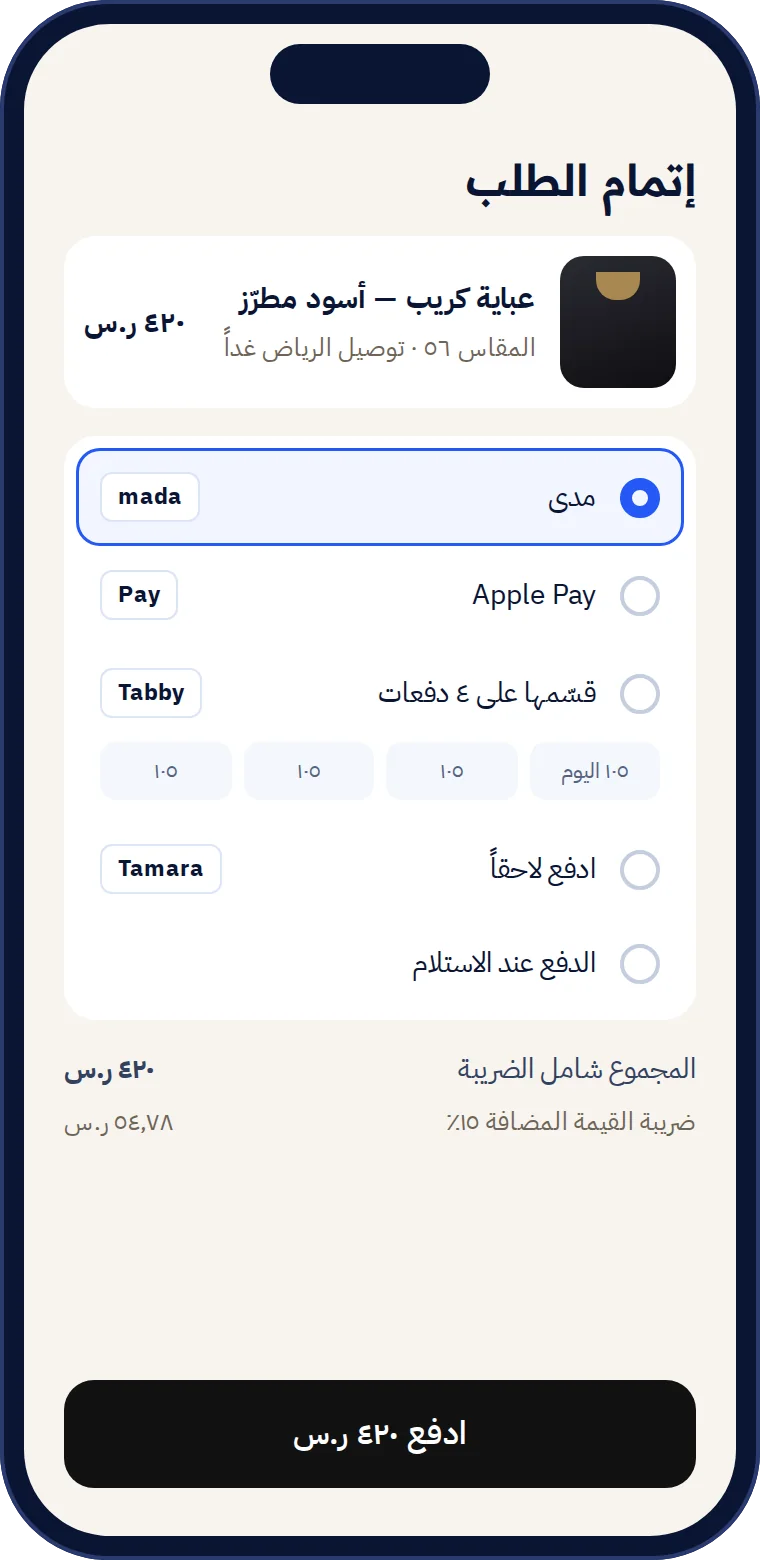
  • mada, Apple Pay and Tabby payments
  • Database and orders dashboard
  • In-region hosting with SSL
Published at daralayan.sa
Checkout screen in a Fanann-built store
  1. 1
    Describe your ideaPaste your plan from Claude, or write it in your own dialect.
  2. 2
    Preview and refineEvery edit by message, or by pointing at the element.
  3. 3
    Publish on your domainIn-region hosting, mada, Tabby and SSL — ready.

Claude or Fanann? Each has its role

General writing and analysis
ClaudeIts strength
FanannFocused on building apps
Building a full app
ClaudeCode you assemble yourself
FanannA ready app from chat
Hosting & publishing
ClaudeOutside the chat
FanannOne click
Database & login
ClaudeBuild it yourself
FanannIncluded
Local payments & invoicing
ClaudeDIY integration
Fanannmada, Tabby and invoicing ready
Use Fanann for…
  • Turning ideas into real apps
  • Hosting, security and backups
  • Local payments and publishing on your domain
Use Claude for…
  • Generating and organizing ideas
  • Writing content and marketing copy
  • Analyzing files and data

For developers: Claude Code in brief

Claude Code is an Anthropic tool that runs in your terminal and editors and edits your project directly. Install with one command, then type claude in your project and sign in with a Pro, Max, Team, Enterprise or Console account:

macOS, Linux and WSLCopy
curl -fsSL https://claude.ai/install.sh | bash
Windows (PowerShell)Copy
irm https://claude.ai/install.ps1 | iex

Claude and Claude Code are trademarks of Anthropic; Fanann is not affiliated. Information current as of September 2026; see code.claude.com/docs and claude.com.

FAQ

Got a question?

We've gathered the questions we hear most about Fanann. Can't find your answer? Our team replies in Arabic.

Can I build a full app with Claude alone?

Claude writes code, but running, hosting and the database are separate steps. Fanann brings them together on one platform.

Does Claude support Arabic?

Yes, in MSA or your own dialect. And Fanann is built for Arabic from the ground up.

Can I publish a project built with Claude Code on Fanann?

Yes, connect a GitHub repo or upload the project, and Fanann prepares and deploys it.

What's the difference between Claude and Claude Code?

Claude is a general chat assistant. Claude Code is a developer tool that works inside your project and edits its files.

Talk to our team
Guide · Claude × Fanann

How do I use Claude? From idea to a live app with Fanann

Claude is a great assistant for writing, analysis and code. But turning its output into a real app is another journey — one Fanann shortens for you.

CWith Claude8 steps · multiple tools
1Write the prompt2Copy the code3Install Claude Code4Set up the project5Choose hosting6Database7Domain & SSL8Maintenance & updates
With Fanann3 steps · one platform
1Describe your idea2Review the plan3PublishLive
Fanann teamLast updated: September 20265 min read

What is Claude, in short?

Claude is an assistant by Anthropic that you talk to in plain language. It helps with writing, summarizing, analysis and coding, and reads files and images. It's available on claude.ai and desktop and mobile apps, and developers get Claude Code, which works inside projects.

Where does Claude excel?

  • Writing & content: Product descriptions, articles and marketing copy in your dialect.
  • Analysis: Summarizing long files and analyzing spreadsheets and reports.
  • Thinking & planning: Organizing your project idea and defining pages and features.
  • Code: Writing and explaining code — and editing whole projects with Claude Code.

But from chat to a live app… it's a long road

If you ask Claude for a full site's code, everything after the code is on you:

Assembling and running the codeCopying files, or installing Claude Code and setting up the project.
Choosing hostingA provider, deployment setup and separate costs to track.
Database and loginCreating, connecting and securing it yourself.
Payments & invoicingConnecting a gateway that supports mada, and issuing compliant invoices.
Domain & SSLConnecting the domain and renewing certificates.
Security & updatesBackups, monitoring and ongoing updates.

The shortcut: build and publish on Fanann

Take the idea you shaped with Claude — or start from scratch — and give it to Fanann Agent. It builds, tests and publishes, and all the infrastructure is on us:

You
Build me an abaya store with sizes and colors, mada and Tabby payments, and delivery within Riyadh and Jeddah.
Done — here's what I built:
  • Mobile-responsive Arabic storefront
  • Product page with sizes and colors
  • mada, Apple Pay and Tabby payments
  • Database and orders dashboard
  • In-region hosting with SSL
Published at daralayan.sa
Checkout screen in a Fanann-built store
  1. 1
    Describe your ideaPaste your plan from Claude, or write it in your own dialect.
  2. 2
    Preview and refineEvery edit by message, or by pointing at the element.
  3. 3
    Publish on your domainIn-region hosting, mada, Tabby and SSL — ready.

Claude or Fanann? Each has its role

ClaudeFanann
General writing and analysisIts strengthFocused on building apps
Building a full appCode you assemble yourselfA ready app from chat
Hosting & publishingOutside the chatOne click
Database & loginBuild it yourselfIncluded
Local payments & invoicingDIY integrationmada, Tabby and invoicing ready
Use Fanann for…
  • Turning ideas into real apps
  • Hosting, security and backups
  • Local payments and publishing on your domain
Use Claude for…
  • Generating and organizing ideas
  • Writing content and marketing copy
  • Analyzing files and data

For developers: Claude Code in brief

Claude Code is an Anthropic tool that runs in your terminal and editors and edits your project directly. Install with one command, then type claude in your project and sign in with a Pro, Max, Team, Enterprise or Console account:

macOS, Linux and WSLCopy
curl -fsSL https://claude.ai/install.sh | bash
Windows (PowerShell)Copy
irm https://claude.ai/install.ps1 | iex

Claude and Claude Code are trademarks of Anthropic; Fanann is not affiliated. Information current as of September 2026; see code.claude.com/docs and claude.com.

FAQ

Got a question?

We've gathered the questions we hear most about Fanann. Can't find your answer? Our team replies in Arabic.

Talk to our team
Can I build a full app with Claude alone?

Claude writes code, but running, hosting and the database are separate steps. Fanann brings them together on one platform.

Does Claude support Arabic?

Yes, in MSA or your own dialect. And Fanann is built for Arabic from the ground up.

Can I publish a project built with Claude Code on Fanann?

Yes, connect a GitHub repo or upload the project, and Fanann prepares and deploys it.

What's the difference between Claude and Claude Code?

Claude is a general chat assistant. Claude Code is a developer tool that works inside your project and edits its files.

Explore more of Fanann

How to use CodexThe short version, and the fastest route to a live app with Fanann.Learn moreHow to build a website with AI3 ways and practical steps from idea to launch.Learn moreFanann vs coding agentsThey write the code; Fanann runs, hosts and protects it.Learn more

Idea ready? Let's build it

Take it from chat to a live app on Fanann today.

Start free · No credit card · Speaks MSA & dialects