Skip to contentTalk to us
Guide · Codex × Fanann

How to Use Codex — and the Fastest Route to a Live App

Codex is a powerful tool for developers, but getting from it to an app your customers use takes many steps. Here's the short version — and how to reach the same result on Fanann from one chat.

Try Fanann freeRead the guide
CWith Codex8 steps · multiple tools
1Install the tool2Sign in3Set up Git4Write and review code5Choose hosting6Database7Domain & SSL8Monitoring & backups
With Fanann3 steps · one platform
1Describe your idea2Review the plan3PublishLive
Fanann teamLast updated: September 20265 min read
Contents
  1. What is Codex, in short?
  2. What does Codex require before your project reaches people?
  3. The shortcut: same result on Fanann
  4. Codex or Fanann? Quick comparison
  5. A developer who loves Codex? Use both
  6. If you try Codex: quick install

What is Codex, in short?

Codex is a coding agent by OpenAI: give it a task in plain language, and it reads your project files, writes code and runs commands, then shows you the changes to approve. It runs in the Codex app on macOS and Windows, the command line, editor extensions like VS Code, and the web.

What does Codex require before your project reaches people?

Codex writes code on your machine — that's halfway there. To turn the project into a site or app your customers use, you need to handle yourself:

Dev environment setupInstalling the tool, terminal and Git, and running the project locally.
Subscription or API keyA ChatGPT plan that includes Codex, or a usage-billed API key.
Reviewing every changeReading and approving diffs, and fixing what breaks yourself.
Server & hostingChoosing a provider, setting up deployment and tracking costs.
Database & domainCreating a production database, and connecting the domain and SSL certificate.
Security & maintenanceSecurity updates, backups and 24/7 monitoring.

The shortcut: same result on Fanann

On Fanann you don't install anything or manage a server. Write your idea in Arabic, the agent builds and tests, then you publish in one click — hosting, security and database included:

You
Build me an abaya store with sizes and colors, mada and Tabby payments, and delivery within Riyadh and Jeddah.
Done — here's what I built:
  • Mobile-responsive Arabic storefront
  • Product page with sizes and colors
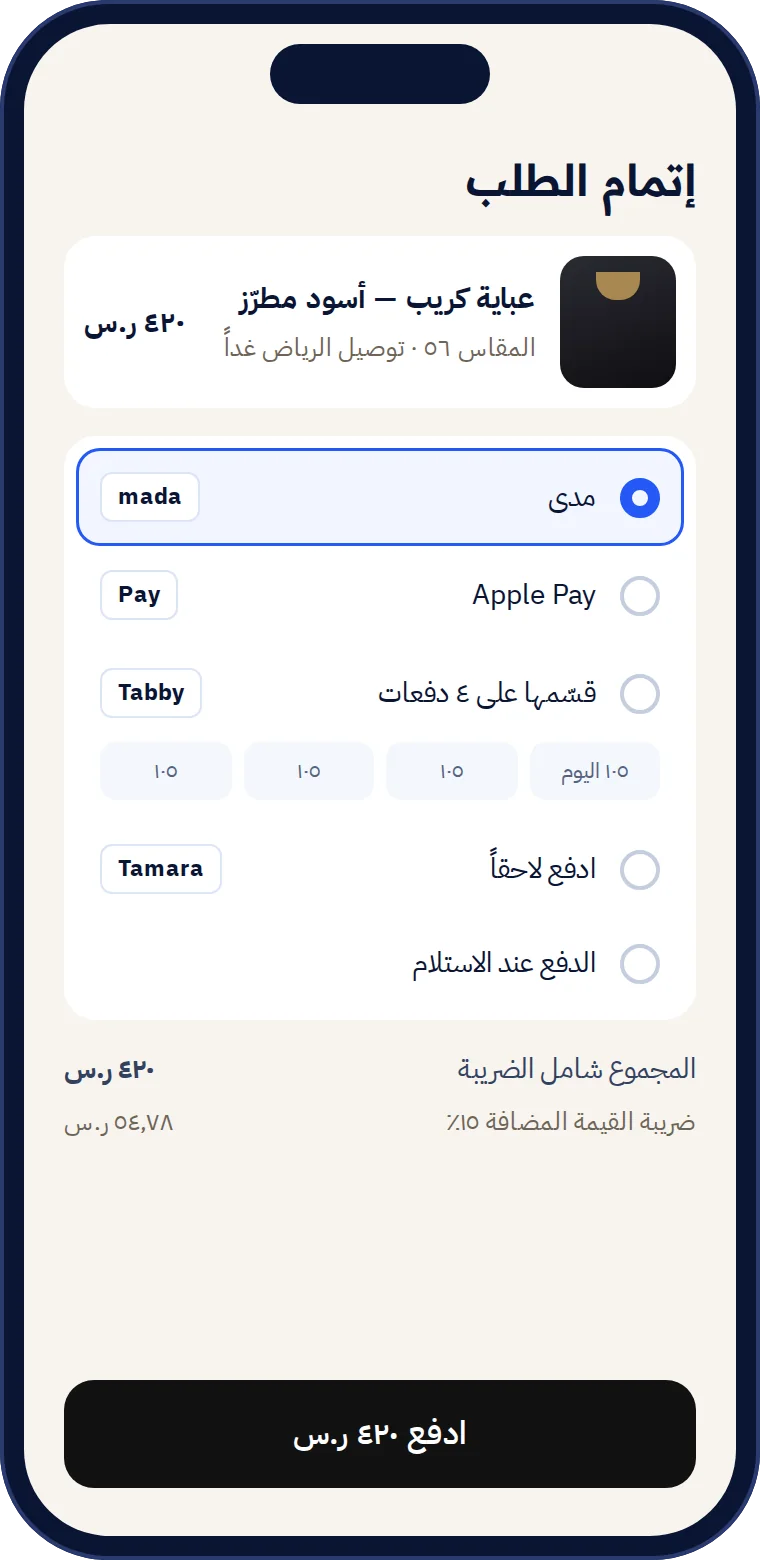
  • mada, Apple Pay and Tabby payments
  • Database and orders dashboard
  • In-region hosting with SSL
Published at daralayan.sa
Checkout screen in a Fanann-built store
  1. 1
    Describe your ideaIn Arabic or your dialect, typed or spoken — no requirements doc.
  2. 2
    Review the plan and refine via chatThe agent lays out pages and features, and you see a live preview of every change.
  3. 3
    Publish on your domainOne click: in-region hosting, SSL, database and backups.

Codex or Fanann? Quick comparison

Expertise needed
CodexDeveloper
FanannNone
Where you start
CodexInstalling a tool on your machine
FanannRight in the browser
Hosting & database
CodexOn you
FanannIncluded
Local payments
CodexBuild it yourself
Fanannmada & Tabby ready
Arabic UIs
CodexOn request
FanannRTL by default
Large existing codebases
CodexIts strength
FanannGreat for web and mobile apps
Fanann suits you if…
  • You want a live app for customers, fast
  • You don't want to manage servers or security
  • You need Arabic, mada and in-region hosting
Codex suits you if…
  • You're a developer on a large existing repo
  • You have hosting and an ops team ready
  • You want an agent inside your own environment and tools

A developer who loves Codex? Use both

No need to choose. Write code with Codex, connect the repo to Fanann — and every push deploys automatically with hosting and security.

TerminalCopy
fanann link github.com/you/my-app
fanann deploy --region me-riyadh-1

If you try Codex: quick install

macOS and LinuxCopy
curl -fsSL https://chatgpt.com/codex/install.sh | sh
Windows (PowerShell)Copy
powershell -ExecutionPolicy ByPass -c "irm https://chatgpt.com/codex/install.ps1 | iex"

Then open your project folder, type codex, and choose “Sign in with ChatGPT”. Plans that include Codex change, so check OpenAI's official page.

Codex is a trademark of OpenAI; Fanann is not affiliated. Information current as of September 2026; see the official docs at developers.openai.com/codex.

FAQ

Got a question?

We've gathered the questions we hear most about Fanann. Can't find your answer? Our team replies in Arabic.

Do I need Codex to build an app with AI?

No. Codex suits developers. With Fanann you describe your idea in Arabic, and the agent builds and publishes — no installs, no coding skills.

Is Codex free?

Codex comes with ChatGPT plans that include it, and offers change over time. Fanann has a free plan you can start on right away.

Can I publish code written with Codex on Fanann?

Yes. Connect a GitHub repo or upload the project, and Fanann prepares and publishes it with hosting and security.

Does Fanann understand Arabic?

Fanann is built for Arabic from the ground up: write in your dialect, and UIs come out right-to-left.

What's the difference between Codex and Fanann?

Codex is a coding agent that writes code in your project. Fanann is a full platform: an agent that builds in Arabic, plus hosting, database, local payments and managed security.

Talk to our team
Guide · Codex × Fanann

How to Use Codex — and the Fastest Route to a Live App

Codex is a powerful tool for developers, but getting from it to an app your customers use takes many steps. Here's the short version — and how to reach the same result on Fanann from one chat.

CWith Codex8 steps · multiple tools
1Install the tool2Sign in3Set up Git4Write and review code5Choose hosting6Database7Domain & SSL8Monitoring & backups
With Fanann3 steps · one platform
1Describe your idea2Review the plan3PublishLive
Fanann teamLast updated: September 20265 min read

What is Codex, in short?

Codex is a coding agent by OpenAI: give it a task in plain language, and it reads your project files, writes code and runs commands, then shows you the changes to approve. It runs in the Codex app on macOS and Windows, the command line, editor extensions like VS Code, and the web.

What does Codex require before your project reaches people?

Codex writes code on your machine — that's halfway there. To turn the project into a site or app your customers use, you need to handle yourself:

Dev environment setupInstalling the tool, terminal and Git, and running the project locally.
Subscription or API keyA ChatGPT plan that includes Codex, or a usage-billed API key.
Reviewing every changeReading and approving diffs, and fixing what breaks yourself.
Server & hostingChoosing a provider, setting up deployment and tracking costs.
Database & domainCreating a production database, and connecting the domain and SSL certificate.
Security & maintenanceSecurity updates, backups and 24/7 monitoring.

The shortcut: same result on Fanann

On Fanann you don't install anything or manage a server. Write your idea in Arabic, the agent builds and tests, then you publish in one click — hosting, security and database included:

You
Build me an abaya store with sizes and colors, mada and Tabby payments, and delivery within Riyadh and Jeddah.
Done — here's what I built:
  • Mobile-responsive Arabic storefront
  • Product page with sizes and colors
  • mada, Apple Pay and Tabby payments
  • Database and orders dashboard
  • In-region hosting with SSL
Published at daralayan.sa
Checkout screen in a Fanann-built store
  1. 1
    Describe your ideaIn Arabic or your dialect, typed or spoken — no requirements doc.
  2. 2
    Review the plan and refine via chatThe agent lays out pages and features, and you see a live preview of every change.
  3. 3
    Publish on your domainOne click: in-region hosting, SSL, database and backups.

Codex or Fanann? Quick comparison

CodexFanann
Expertise neededDeveloperNone
Where you startInstalling a tool on your machineRight in the browser
Hosting & databaseOn youIncluded
Local paymentsBuild it yourselfmada & Tabby ready
Arabic UIsOn requestRTL by default
Large existing codebasesIts strengthGreat for web and mobile apps
Fanann suits you if…
  • You want a live app for customers, fast
  • You don't want to manage servers or security
  • You need Arabic, mada and in-region hosting
Codex suits you if…
  • You're a developer on a large existing repo
  • You have hosting and an ops team ready
  • You want an agent inside your own environment and tools

A developer who loves Codex? Use both

No need to choose. Write code with Codex, connect the repo to Fanann — and every push deploys automatically with hosting and security.

TerminalCopy
fanann link github.com/you/my-app
fanann deploy --region me-riyadh-1

If you try Codex: quick install

macOS and LinuxCopy
curl -fsSL https://chatgpt.com/codex/install.sh | sh
Windows (PowerShell)Copy
powershell -ExecutionPolicy ByPass -c "irm https://chatgpt.com/codex/install.ps1 | iex"

Then open your project folder, type codex, and choose “Sign in with ChatGPT”. Plans that include Codex change, so check OpenAI's official page.

Codex is a trademark of OpenAI; Fanann is not affiliated. Information current as of September 2026; see the official docs at developers.openai.com/codex.

FAQ

Got a question?

We've gathered the questions we hear most about Fanann. Can't find your answer? Our team replies in Arabic.

Talk to our team
Do I need Codex to build an app with AI?

No. Codex suits developers. With Fanann you describe your idea in Arabic, and the agent builds and publishes — no installs, no coding skills.

Is Codex free?

Codex comes with ChatGPT plans that include it, and offers change over time. Fanann has a free plan you can start on right away.

Can I publish code written with Codex on Fanann?

Yes. Connect a GitHub repo or upload the project, and Fanann prepares and publishes it with hosting and security.

Does Fanann understand Arabic?

Fanann is built for Arabic from the ground up: write in your dialect, and UIs come out right-to-left.

What's the difference between Codex and Fanann?

Codex is a coding agent that writes code in your project. Fanann is a full platform: an agent that builds in Arabic, plus hosting, database, local payments and managed security.

Explore more of Fanann

How to use ClaudeFrom an idea in chat to a live app with Fanann.Learn moreHow to use ReplitAn Arabic guide, and when Fanann is the best fit for your project.Learn moreFanann vs ReplitA full comparison: language, payments, hosting and pricing.Learn more

Leave code and servers to us

Describe your project in Arabic, and Fanann builds and publishes it today.

Start free · No credit card · Speaks MSA & dialects