Buy ready software when your need is standard and regulated, such as full accounting, payroll and e-invoicing. Build your own when your workflow is specific, when a monthly per-seat fee bothers you, or when you want documents in Arabic and English your way. Many small UAE companies combine both: ready accounting software, plus built tools for quotations, stock, attendance and reception. In Fanann you describe the tool and download it as a Windows program. It shows VAT on your documents, while the Federal Tax Authority's requirements are yours to verify with your accountant.
- software for small companies in uae
- should I buy software or build my own for my company
- quotation and invoice software for a trading company in dubai
- business software without per user subscription
- typing center management software uae
- excel alternative for small businesses in the uae
Build or buy: what is the real question?
 Illustration
A company is set up in the UAE within days, then spends years on what was at hand in week one: Excel for quotations, Word for invoices, a WhatsApp group for orders. When work grows the question arrives: buy a system or commission custom software?
Put that way it misleads, because it assumes one decision for the whole company. The sharper version: which part of our work is standard, and which part is our own way? Standard is usually bought. Specific is built. And building is now within reach of a five-person company.
- Usually bought
- Full accounting, payroll, email, file storage
- Usually built
- Quotations, transaction tracking, specific stock
- The deciding factor
- How specific your workflow is
- The common mistake
- A big system for a small need
What do small UAE companies actually run on?
| Company | Daily work | What is usually missing |
|---|---|---|
| Trading company (wholesale, distribution) | Quotation, local purchase order (LPO), delivery note, invoice | Linking those documents, and a price list per customer |
| Typing and services center | Government transactions for customers, fees and charges | Tracking each transaction's status, and fees kept apart from charges |
| Free-zone company (consulting, marketing) | Projects, hours, monthly invoices | Tracking hours and amounts due per client |
| Salon or beauty center | Appointments, services, staff commission | An appointment board and month-end commission |
| Cafeteria or grocery | Fast sales and building deliveries | A bilingual cashier and a credit ledger |
| AC and maintenance contractor | Visits, job orders, parts and labor | A technician schedule and an invoice from the job order |
| Real estate brokerage | Properties, clients, viewings, commissions | Following clients, deals and commission due |
The missing column never mentions accounting, which mature ready software solves. What is missing is the daily work that leads to an invoice.
When is buying ready software the right call?
- The need is standard: journals and balance sheets are alike in every company. Building them from zero reinvents the wheel.
- It is regulated: payroll and the wage protection system, tax returns, and e-invoicing as it phases in. Leave these to vendors who track the rules.
- You need ready integrations: payment gateways, delivery apps, banks. A large vendor has built those links already.
- Nobody has time: ready software comes with support and training. Building needs someone who knows the work and follows through.
- Staff change often: a well-known program means a new hire may have used it before.
When is building your own the right call?
- Your workflow does not fit the mold: tiered pricing per customer, transactions with stages of your own, or a document no software offers.
- Per-seat fees are swelling: ten employees each need one simple screen, and you pay a full seat for each.
- You want your two languages your way: a quotation in English for one customer and in Arabic for a government entity, same layout, same numbers.
- You need offline work: a warehouse in an industrial area, a job site, or a counter that cannot afford an outage.
- You want your data with you: on your PC, with your backup, in the shape you choose.
Buy what makes you like everyone else. Build what sets you apart.
What should I compare besides the price on the quote?
| Item | Ready software | Built program |
|---|---|---|
| Payment model | Recurring, usually per seat | A subscription to the building tool, no fee per PC installed |
| Customization | Within what the vendor allows | Ask in words and see it in the preview |
| Time to start | Today, then weeks of adjustment | Days to describe and test, quick to learn because it fits |
| Support | The vendor's team | You, plus the builder for changes |
| Data | With the vendor, in the format offered | On your PC or in a shared cloud database |
| Offline work | Rare in cloud systems | Available with local data |
| Hardware | Ready integrations in some systems | Windows printers and keyboard-type scanners, tested by you |
| Exit | Export, then migrate elsewhere | The program and the data are with you |
Work out cost over three years, not one month, including staff time. Cost drivers are in what it costs to build a Windows program.
How do I decide for my own company?
Pick the one that sounds like you to see the advice.
Buy. Choose accounting software known in the UAE that your accountant knows, and confirm data export and Arabic on documents.
Build. Quotations, transaction tracking, technician schedules, price lists: these change with your business, and you should own the changes.
Build from the sheet: the columns and data exist, and you only need screens, permissions and reports.
Neither yet. Write down a week of the company's work and where time is lost. The answer shows up on that page.
Then decide between an installed PC program (office, counter, warehouse) and a web system (mobile team, outside users). See desktop app or web app and internal tools for UAE companies.
What about VAT, records and customer data?
- 5% VAT: if your company is registered, its tax invoices show the Tax Registration Number and the VAT amount. A built program calculates VAT at the rate you set and shows it.
- Free-zone companies: tax treatment varies by zone, activity and type of transaction. Assume nothing, and settle with your accountant what your documents show.
- E-invoicing: being introduced in phases through accredited service providers. Follow Ministry of Finance and FTA guidance to learn when it covers you.
- Record keeping: tax rules require records to be kept for a set period, so ask your accountant, and make backups at least a weekly habit.
- Personal data: customer numbers and staff details fall under data protection law, and some financial free zones have their own regimes.
Plain-language references: UAE tax invoice requirements and the UAE PDPL checklist.
What does building look like in practice with Fanann?
In the Windows app builder you describe the tool in Arabic or English, typed or spoken, or start from one of eight templates. You watch it run inside a Windows-style window and change it in words or by clicking an element. Then you choose local data on one offline PC, or cloud data shared by the team, and download an installer for 64-bit Windows 10 or 11.
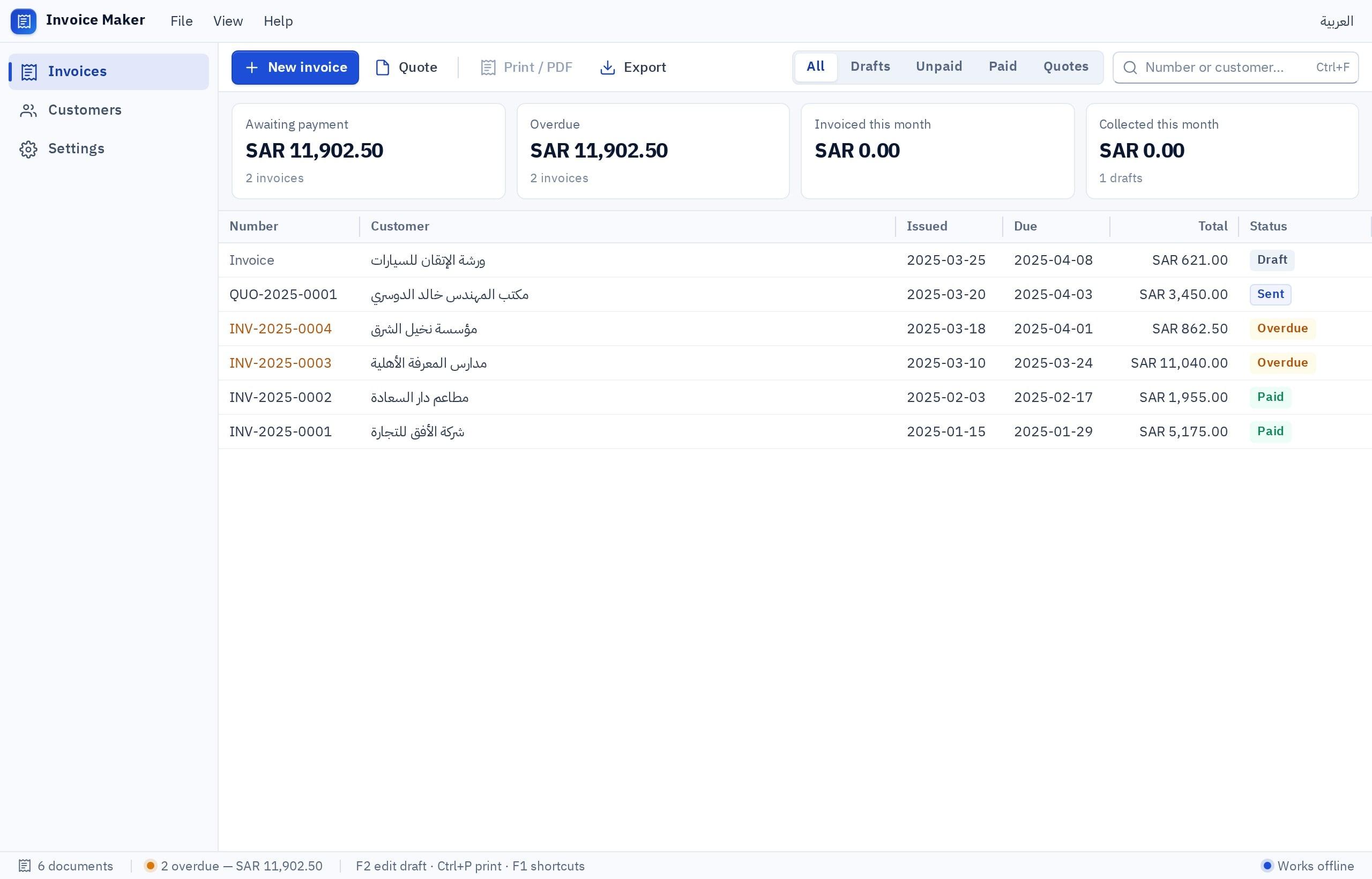
I want a quotation and delivery note program for a trading company in Dubai selling building materials wholesale, in Arabic and English, with the language of each document chosen at print time. Customer list: name, TRN, address, payment terms and assigned price list (A, B, C). Item list with a code, a name in both languages, a unit and three prices by list. Quotation: I pick the customer and their prices load, I add lines with a discount per line, and 5% VAT is calculated on its own line, with a validity period and automatic numbering QT-2026-0001. Quotation statuses: draft, sent, accepted, rejected. On acceptance I record the LPO number and convert the quotation to a delivery note numbered DN, with partial delivery showing remaining quantities. A4 printing with the company logo, and save as PDF. A follow-up screen: quotations with no reply for 7 days, and orders not fully delivered. A monthly report of accepted quotation value per salesperson, exportable to a file for the accountant. Three roles: salesperson seeing only their quotations, sales manager, and storekeeper seeing delivery notes only.
Try it in FanannCandidly: several roles across PCs need cloud data, sign-in and internet. And it is Windows only, so a team on Macs is better served by a web app, which can start from an Excel sheet.
What is a thirty-day plan to try building with no risk?
- Days 1-3Pick one tool
The most repeated and least risky. A good example: quotations. A bad one: accounting.
- Days 4-7Describe and try
Write the description with the employee who does the work, not alone. Try the preview together and adjust.
- Week 2Install on two PCs
Download the installer and test printing and PDF with real documents in both languages.
- Week 3Run both
The new tool next to Excel. Log every gap and ask for it in a new version.
- Week 4Decide
Did it save time? Did the team use it unprompted? If yes, adopt it and start the second.
More: digital transformation for UAE companies and the UAE page.
Key takeaways
- The right question: which part of my work is standard, so I buy it, and which part is ours, so I build it?
- A per-seat fee looks small in the quote and grows with every hire and every year.
- Do not build what carries heavy regulation, such as full accounting, payroll and wage protection.
- Build what sets you apart: quotations, transaction tracking, price lists, your bilingual documents.
- Start with one small tool used every day, and measure its effect after thirty days.
Frequently asked questions
Should a small company in the UAE buy software or build it?
Is a built program cheaper than a monthly subscription?
Can I build a full accounting program?
Does the program work on several PCs in the office?
Does it run on Mac computers?
Is it suitable for free-zone companies?
Ask your AI assistant about this
Copy this prompt into the AI assistant you use, then add the details of your own case.
I am reading this guide: “Windows software for small companies in the UAE: build or buy?” https://fanann.com/en/blog/business-software-uae-small-companies/ My question: software for small companies in uae Use that page as a source and explain the answer step by step for my situation, tell me what to check before I start, and cite the page link.