A cashier program for a shop in the UAE must calculate 5% VAT and show it with the Tax Registration Number on the invoice, work in Arabic and English together on screen and receipt because staff and customers speak different languages, record phone and delivery orders and the payment method, and close the drawer daily. You can subscribe to a ready system or build your own: in Fanann you describe it and download a program for Windows 10 or 11. A built program shows VAT on the invoice, while tax invoice and e-invoicing requirements should be checked in the FTA's official guidance or with your accountant.
- cashier program in uae
- pos software for a cafeteria in dubai
- arabic english pos with 5 vat
- grocery pos program in sharjah
- how do I make a cashier program for my shop in the uae
- pos software without monthly subscription uae
What does a cashier deal with in a UAE shop every day?
It is 9:30 pm in a Karama cafeteria. The phone rings with an order for flat 804 in the next building, and two customers stand at the counter, one ordering in Arabic and one in English, while the salesperson entering orders reads English faster. Within two minutes three correct receipts must come out, each carrying VAT.
 Illustration
That scene sums up a cashier in the UAE: two languages at once, counter sales plus nearby delivery, and a multinational team that changes often, so the program must be learnable in an hour.
- Tax
- 5% VAT shown on the invoice
- Language
- Arabic and English together
- Currency
- Dirhams and fils, with a cash rounding rule
- Selling
- Counter, phone, WhatsApp, nearby delivery
- Payment
- Cards, phone wallets, cash
Screens and hardware are in the general guide, a cashier program for a PC.
What must appear on a cashier invoice in the UAE?
| Detail | Practical note |
|---|---|
| The words Tax Invoice | Clearly at the top for registered businesses |
| Business name and address | As on the trade license |
| Tax Registration Number (TRN) | Entered once in settings, shown on every invoice |
| Invoice number and date | A sequence that never repeats or goes back |
| Items or services | In English and Arabic where possible, with quantity and price |
| VAT amount at 5% | On its own line, or a statement that the price includes VAT |
| Total payable | In dirhams, the most prominent number |
| Payment method | Cash, card, payment link, credit |
More in UAE tax invoice requirements and the UAE e-invoicing timeline.
How do I make the cashier work in Arabic and English together?
Every product claims to support Arabic. The real test is both languages within one sale, with nothing to switch:
- Two names per item: English and Arabic. Staff search by either, and the receipt prints both or the one you choose.
- An interface per user: each employee signs in and sees the screen in their preferred language, right to left for Arabic.
- A bilingual receipt: fixed labels (Total, VAT) in both languages on the same line.
- Flexible search: in Arabic or Latin letters or by item number, since item names are spelled several ways.
- Digits as 0-9 everywhere, clear to the whole team.
Fanann programs come in Arabic and English. If your team speaks other languages, English is usually the shared one, and item buttons with pictures or colors help a new hire. See also a bilingual Arabic and English website.
What does each kind of shop need?
| Shop | How it sells | What the cashier must do well |
|---|---|---|
| Cafeteria or juice shop | Counter, phone orders, delivery to buildings | Fast buttons, modifiers, customer address (building and flat), delivery status |
| Grocery or mini supermarket | Many items, fast scanning | Barcode scanner, piece and carton, a credit ledger for building residents |
| Salon or beauty center | Services by a named staff member | The provider's name on each line, packages, tips recorded separately |
| Typing and services center | Government fees plus a service charge | Fees paid on the customer's behalf kept apart from your charge, and the transaction number on the receipt |
| Trading company with a showroom | Wholesale and retail | Several price lists, an A4 invoice for companies with their TRN, credit sales |
| Phones and electronics | Devices with serial numbers and warranty | Serial number on the invoice, warranty period, exchange |
| Perfume, abayas and gifts | Visitors, residents and seasons | Several units, gift wrapping, an exchange receipt with no price |
For service centers, government fees are treated differently for tax than your service charge, so ask your accountant how to show them. For online orders, see a restaurant ordering app in the UAE.
How does the program record payment and delivery orders?
- Cards and phone wallets: through the card terminal on the counter. Staff key the amount into the terminal, then choose Card in the program.
- Cash: with change calculated. Set a rounding rule for cash totals. Many shops round to the nearest 25 fils because smaller coins are scarce.
- Payment on delivery: the order leaves as uncollected and closes when the driver returns with the money. It needs a screen of orders out with each driver.
- Delivery app orders: record them as a separate type so your report shows how much came from each app and its commission.
- Credit: building residents or nearby companies with a monthly account. It needs a balance and a statement per customer.
See also cash on delivery in the UAE.
Should I subscribe to a ready system or build my own?
The UAE market is full of POS systems, many good and bundled with hardware. The question is whether you pay for what you use.
Pick the one that sounds like you to see the advice.
Choose a ready system that connects to delivery apps. Keying dozens of orders by hand daily wears the team out.
A program built from a template is enough: sell, a bilingual VAT receipt, a drawer close. And it works offline on your PC.
A services center separating fees from charges, a salon with staff commissions, trading with price lists: building gives you fields a general template lacks.
You need shared data, permissions and unified reports. Compare a ready chain system with a built program on cloud data.
- Hardware, setup and support from one vendor
- Links to delivery apps and payment terminals in some systems
- Updates as regulations change
- A recurring fee that usually grows with tills and branches
- A screen and receipt cut to your shop and its two languages
- Offline operation with local data
- No fee per PC you install it on
- Hardware testing and backups are your job
One till, or several PCs and branches seeing the same sales?
A single-counter shop suits local storage: everything sits on the shop PC and selling continues when the internet drops. A counter plus a PC in the office, or branches in Dubai and Ajman whose sales you want together, need cloud data: everyone signs in and sees the same records, given internet.
You cannot have both, and with local storage the daily backup is yours. Details in local or cloud database.
How do I build my shop's cashier with Fanann?
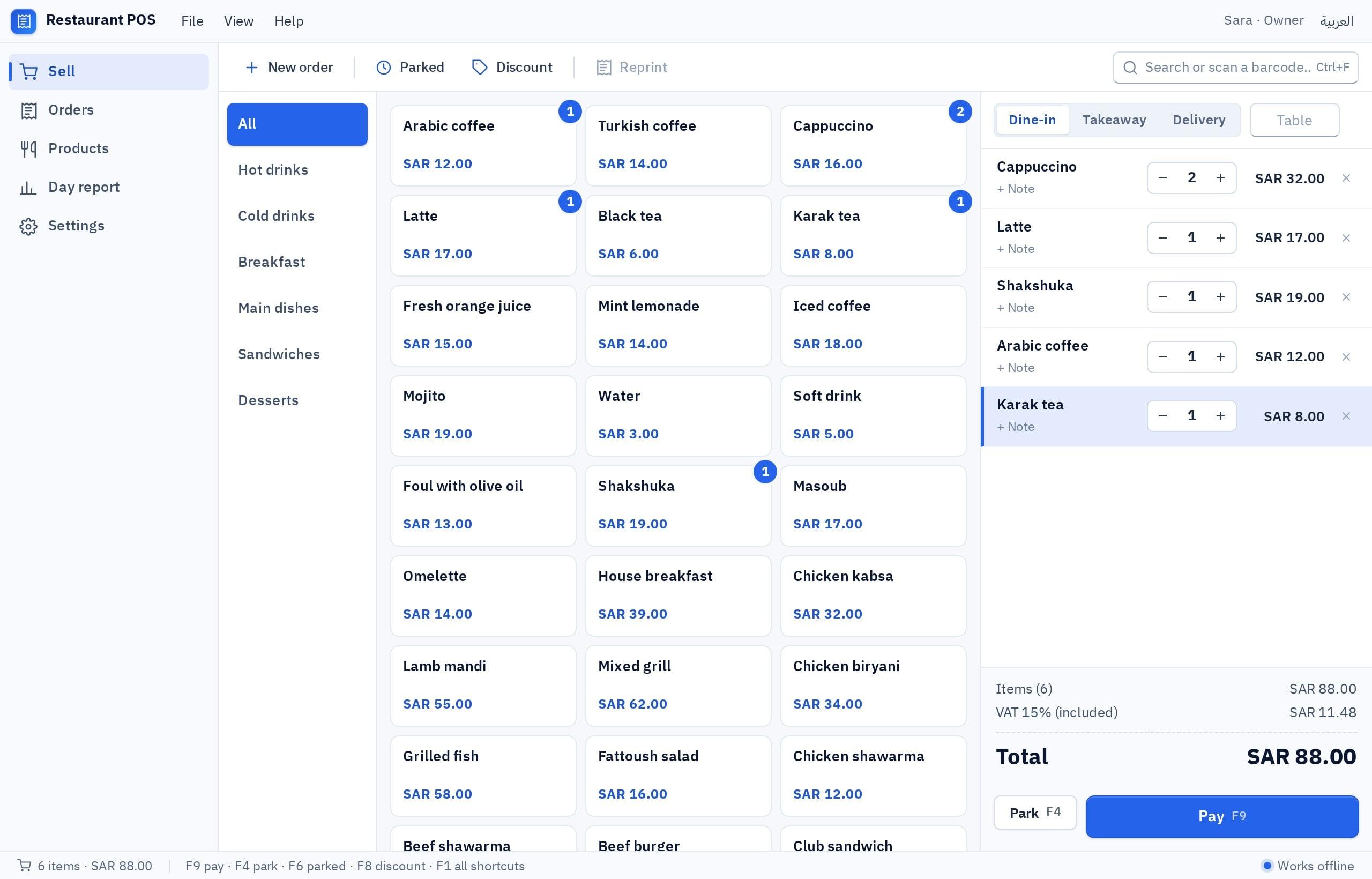
In the POS software builder, start from the POS template or a description in Arabic or English and watch the cashier run inside a Windows-style window. Then choose where data lives and download an installer for 64-bit Windows 10 or 11.
I want a cashier program for a cafeteria in Dubai, in Arabic and English: each user picks their interface language, with Arabic right to left. Every item has an English name, an Arabic name and a category (sandwiches, juices, tea and coffee, meals), with optional modifiers. Search by either name. Order types: counter, takeaway, delivery. For delivery I record the customer's name, mobile, building and flat number, addresses are saved for the next order, and I pick the driver and the status (preparing, out, collected). Prices include 5% VAT, and the receipt is bilingual on the same line with the words Tax Invoice, the shop name, TRN, invoice number, date, VAT amount and total in dirhams. Payment: cash with change and rounding to the nearest 25 fils, card (recorded by hand), or credit for customers with a monthly account. A separate order type for delivery apps with the app name. Open and close a shift with a cash count. A daily report by order type, payment method and driver. 80 mm thermal printing and backup to a file.
Try it in FanannWhat should I test before trusting it at rush hour?
- 1Test with your accountant
Send five varied receipts over: are the content, TRN and VAT presentation right?
- 2Test with your newest hire
Hand it over with little explanation. A printed receipt within ten minutes means the screen is clear.
- 3Test a mock rush
Twenty orders in fifteen minutes: counter, phone and delivery together.
- 4Test the end of day
Close the shift, count the cash, and compare card sales with the terminal's settlement slip.
More: the UAE page and Windows software for small companies in the UAE.
Key takeaways
- Two languages in the UAE are a daily need, not decoration: the salesperson reads English and the customer may want an Arabic receipt.
- VAT and the TRN appear on the invoice, and its mandatory content is set by the Federal Tax Authority.
- Phone, WhatsApp and building deliveries are part of daily sales, so ask for a screen for them in the first version.
- The card terminal is separate from the program. A daily match with its settlement slip covers the gap.
- One till works on local data with no internet. Branches need shared cloud data.
Frequently asked questions
What is the best cashier program for a shop in the UAE?
Does the program calculate 5% VAT?
Does it print the receipt in Arabic and English?
Does the program connect to delivery apps?
Is it suitable for a free zone company?
Does the cashier work without internet?
Ask your AI assistant about this
Copy this prompt into the AI assistant you use, then add the details of your own case.
I am reading this guide: “Cashier program for a shop in the UAE: what it must do” https://fanann.com/en/blog/cashier-program-uae/ My question: cashier program in uae Use that page as a source and explain the answer step by step for my situation, tell me what to check before I start, and cite the page link.