Software that works without internet keeps its data in a local database on the PC itself, so it opens, sells, prints and saves even when the connection is down. You need it when your internet is weak or patchy, when all the work happens on one PC such as a single cashier, or when you prefer to keep the records with you. The trade-off is that the records do not appear on another PC, and backups are your own responsibility.
- software that works without internet
- offline POS software for a small shop
- does cloud software work when the internet goes down
- offline accounting program for PC
- how to make a program that works offline
- sales and inventory software without internet
What does 'works without internet' actually mean?
Software that works without internet is a program with everything it needs on the PC: its screens, its logic and, above all, its records. Invoices, products and customers sit in a local database on the same disk. So it does not care whether the router is working.
A cloud program, by contrast, keeps the records on a distant server. The screen is in front of you, but every save travels over the internet. If the road is cut, the work stops.
One detail many people miss: 'without internet' does not mean 'never any internet'. You need a connection once to download the installer, and again whenever you want a new version. In between, the program runs on its own.
When do I really need software that works offline?
Many people ask for it as a precaution; fewer truly need it. These are the three situations where it is a requirement, not a nice-to-have:
 Illustration
1. Your internet is weak or patchy
A warehouse in an industrial area, a shop in a crowded traditional market, a farm, a rest stop on a highway, a kiosk at a seasonal event. If the network drops even once a week at peak time, each outage means customers walking away, or invoices written on paper and then forgotten.
2. All the work happens on one PC
A single cashier in a grocery or small café, a freelancer issuing invoices, an accountant tracking petty cash. If no second PC needs the same records, there is nobody to share with, and the cloud only adds dependence on the network without giving anything back.
3. You prefer to keep the records with you
Some owners are more comfortable when their numbers sit on their own PC rather than a server. That is a legitimate choice, but it does not make the data safe automatically: a Windows password, a locked office and backups all become your job. If you store customers' personal data, check what your country's data protection law requires; here is an overview of data rules in the Gulf.
What do I give up in exchange for working offline?
Nothing is free. Read this list before you decide, not after you are surprised:
| What you give up | What it means in practice |
|---|---|
| Shared records | Two PCs do not see each other's invoices. Five PCs means five separate sets of data |
| Remote monitoring | You cannot see today's sales from your phone while away from the shop |
| Automatic backup | If the PC dies or is stolen with no copy, the records are gone and nobody can restore them |
| A new PC that is ready at once | Any new installation starts empty; you move records by restoring a backup |
| Automatic updates | You download a new version and install it over the old one yourself |
What are my options for getting offline software?
| Option | Its strength | What it lacks |
|---|---|---|
| An Excel file | You already have it and it works with no network | No entry screens or permissions, and it breaks as rows and hands multiply |
| Ready-made installed software | Mature and proven | Imposes its own way of working, and many newer products are cloud subscriptions |
| A developer builds it for you | Made exactly to measure | Cost and time, and you need them again for every later change |
| Describe it to an AI builder | Made to measure, and you change it yourself | You do the testing, and the limits on connected devices are clear |
If Excel still does the job, there is no rush. But when the errors begin, from a row deleted by mistake to two copies of the file and no idea which is right, that is the signal to move. Signs your business has outgrown Excel lists clearer ones.
How do I get an offline program made for my work?
In Fanann's Windows Studio you describe the program, and when asked where the data lives you choose 'local database'. That single choice is what makes the installed program run with no network.
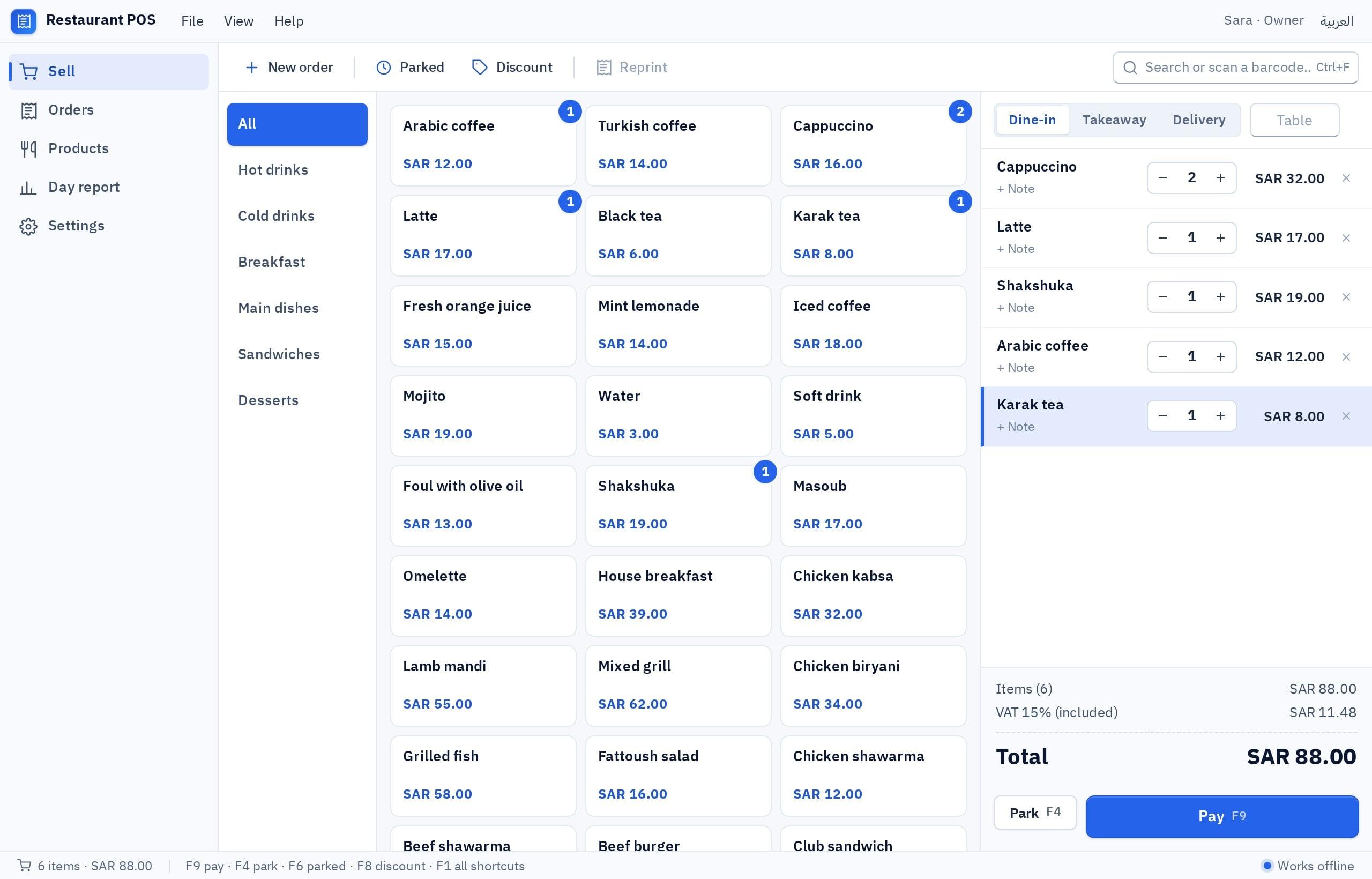
I want a Windows cashier program in Arabic and English for a small grocery with one PC, a receipt printer and a USB barcode scanner. Sales screen: a field that takes the barcode and adds the item to the invoice directly, with search by name for items that have no barcode, quantity change, line removal, an invoice discount, and 15% VAT and the total calculated. Payment by cash or card (the method is recorded by hand) with change calculated. Print a receipt with the shop name and tax number. Products screen: name, barcode, price, quantity, alert level. An end-of-day report of sales by payment method. F2 starts a new invoice and F9 goes to payment. It must work fully without internet, with a backup button that saves the data to a file and a restore button.
Try it in Fanann- 1Try it in the window
Enter ten real products and run a full invoice from start to finish.
- 2Choose a local database
And confirm it. The template itself suggests local for a single till.
- 3Switch on printing and backup
In the abilities, or the print and backup buttons will not work after installation.
- 4Install and test with no network
Download the installer, install it on the shop PC, then disconnect the internet and work.
How do I protect data that lives on one PC?
This is the other face of working offline. The records are on one PC, and that PC can have a disk failure, a spilled cup of tea, or a break-in. The program saves all its data to a backup file and restores it, but you are the one who presses the button and keeps the file somewhere safe.
What if I need a second PC later?
Pick the one that sounds like you to see the advice.
Install the program on the new PC, then restore the latest backup on it. All the records move over.
Install the same program on it. It works with no network and keeps its own records, and you add up the two reports by hand at the end of the day.
This is where you move to a cloud database. Local records do not move by themselves: save a backup first, then everyone installs the new version and signs in. After that the program needs internet.
Starting local and moving to the cloud as you grow is a reasonable path, provided you know it is a move that needs planning, not a switch you flip. Details are in local database or cloud database, and for tills specifically in a cashier program for your PC.
How do I confirm it truly works without internet?
Do not take any promise on trust, ours included. Test it yourself on the PC where the program will run:
- Unplug the network cable or turn off Wi-Fi in Windows.
- Close the program completely and open it again. It should open with no message about the connection.
- Issue five complete invoices and print their receipts.
- Add a new product and change the quantity of another.
- Open today's report and confirm the numbers match what you entered.
- Restart the PC with the network still off, and confirm everything was saved.
- Save a backup to a USB stick with the network off.
Working without internet does not mean working without care. The network is no longer your weak point, but the PC now is.
Key takeaways
- 'Offline' means the data is on your PC. That is the source of both the strength and the responsibility.
- Three sound reasons: weak internet, a single cashier who cannot stop, and a wish to keep records on your own machine.
- What you give up: sharing records between PCs, remote monitoring, and automatic cloud backup.
- A weekly backup kept off the PC is not a luxury. Without it, one failure erases everything.
- Test offline for real: disconnect the network and work for a full hour before you rely on the program.
Frequently asked questions
Is there cashier software that works without internet?
Does cloud software stop when the internet goes down?
Where is my data stored in a program that works offline?
What happens if the PC breaks?
Can I use the program on two PCs without internet?
Does the program need internet to update?
Ask your AI assistant about this
Copy this prompt into the AI assistant you use, then add the details of your own case.
I am reading this guide: “Software that works without internet: when you need it, how to get it” https://fanann.com/en/blog/software-that-works-offline/ My question: software that works without internet Use that page as a source and explain the answer step by step for my situation, tell me what to check before I start, and cite the page link.