The best Windows program ideas for small businesses replace a notebook or an Excel file used every day: a café or grocery cashier, a customer credit ledger, shelf price labels, a salon or clinic front desk, repair job cards, invoices and quotations, petty cash, staff attendance, stock and warehouse labels, and training-center registration. Each can be built by describing it in your own words and downloaded as a Windows installer.
- Windows program ideas for small business
- software ideas for small shops
- what software do small businesses need
- simple desktop app ideas to sell
- small business software ideas that make money
- program ideas for beginners that businesses use
How do I know a program idea is worth building?
Good Windows program ideas do not come from brainstorming. They come from standing behind a shop counter for fifteen minutes: a worn notebook, an Excel file called final2, a note taped to the monitor. Each is a program waiting to be built, and businesses already pay for these problems in ill-fitting subscriptions, staff hours or repeated mistakes.
 Illustration
The twenty-five ideas below are grouped by sector. Each has a line on who needs it and a short prompt, in quotes, to copy into Windows Studio and extend with your own details.
What are the program ideas for shops, cafés and groceries?
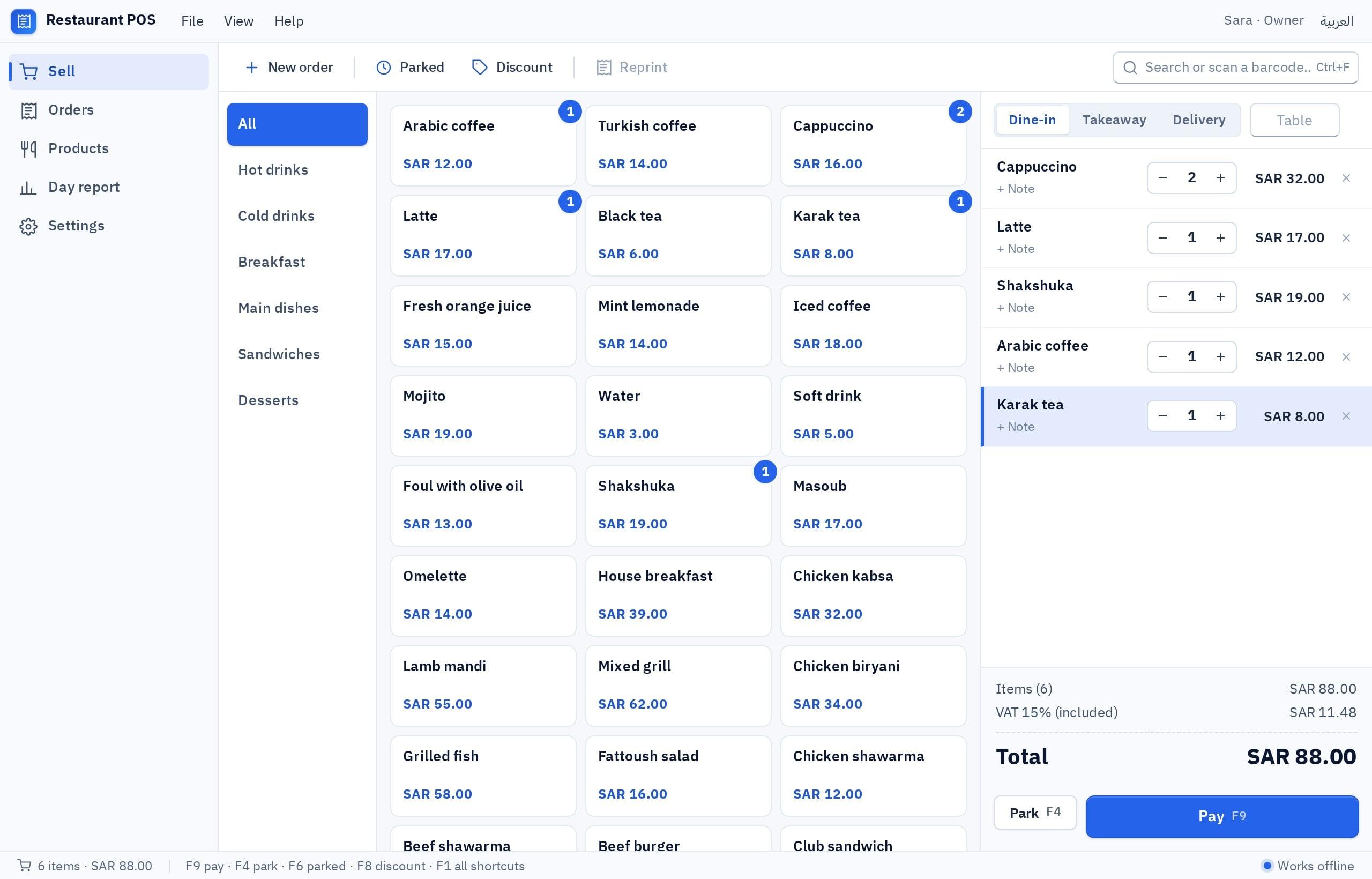
- 1. Café or small restaurant cashier. For orders taken by tapping products: 'A café POS: products in categories with prices, an open order with total and tax, receipt printing, and today's sales report.'
- 2. Grocery cashier with barcodes. For a shop with hundreds of packaged items: 'A grocery cashier: a barcode field that adds the item, search by name, change calculation, a receipt, and an end-of-day report.'
- 3. Shelf price labels. For a shop whose prices change often: 'A tool that reads an Excel file of products and prints price labels at the size I choose, with copies per item.'
- 4. Daily cash closing. For an owner who wants to know where the cash went: 'Shift closing: opening float, cash and card sales, till expenses, the actual count and the difference, with a printable report.'
- 5. Customer credit ledger. For a grocery that sells on credit to neighborhood customers: 'A debt ledger: customers, credit purchases and payments, a balance per customer, a printable statement, and a highlight for anyone over their limit.'
- 6. Supplier orders. For a shop juggling several suppliers: 'A purchasing log: suppliers, orders with items and quantities, status, amount paid and outstanding, and a monthly report per supplier.'
For the cashier in detail: a cashier program for your PC.
What are the program ideas for services, clinics and salons?
- 7. Salon front desk. For a receptionist managing several stylists: 'An appointment calendar with a column per stylist, book, move and cancel, no double bookings, and customer notes.'
- 8. Clinic front desk. For a dental or physiotherapy clinic: 'A daily appointment board per doctor, an ordered waiting list, patient contact details, and a visit-count report.' It is not a certified medical system, so do not store sensitive health data without checking your local rules.
- 9. Repair workshop job cards. For a phone, air-conditioning or car workshop: 'Repair orders: customer, device, fault, technician, status, cost, a numbered drop-off receipt, and search by mobile.'
- 10. Laundry or tailor orders. For a shop that returns items on a date: 'Orders: customer, items, price, due date, a numbered receipt, and lists of ready and uncollected orders.'
- 11. Gym or center memberships. For a small gym or activity center: 'Members: plan type, start and end dates, amount paid, memberships ending this week, and a monthly revenue report.'
What are the program ideas for offices, accountants and freelancers?
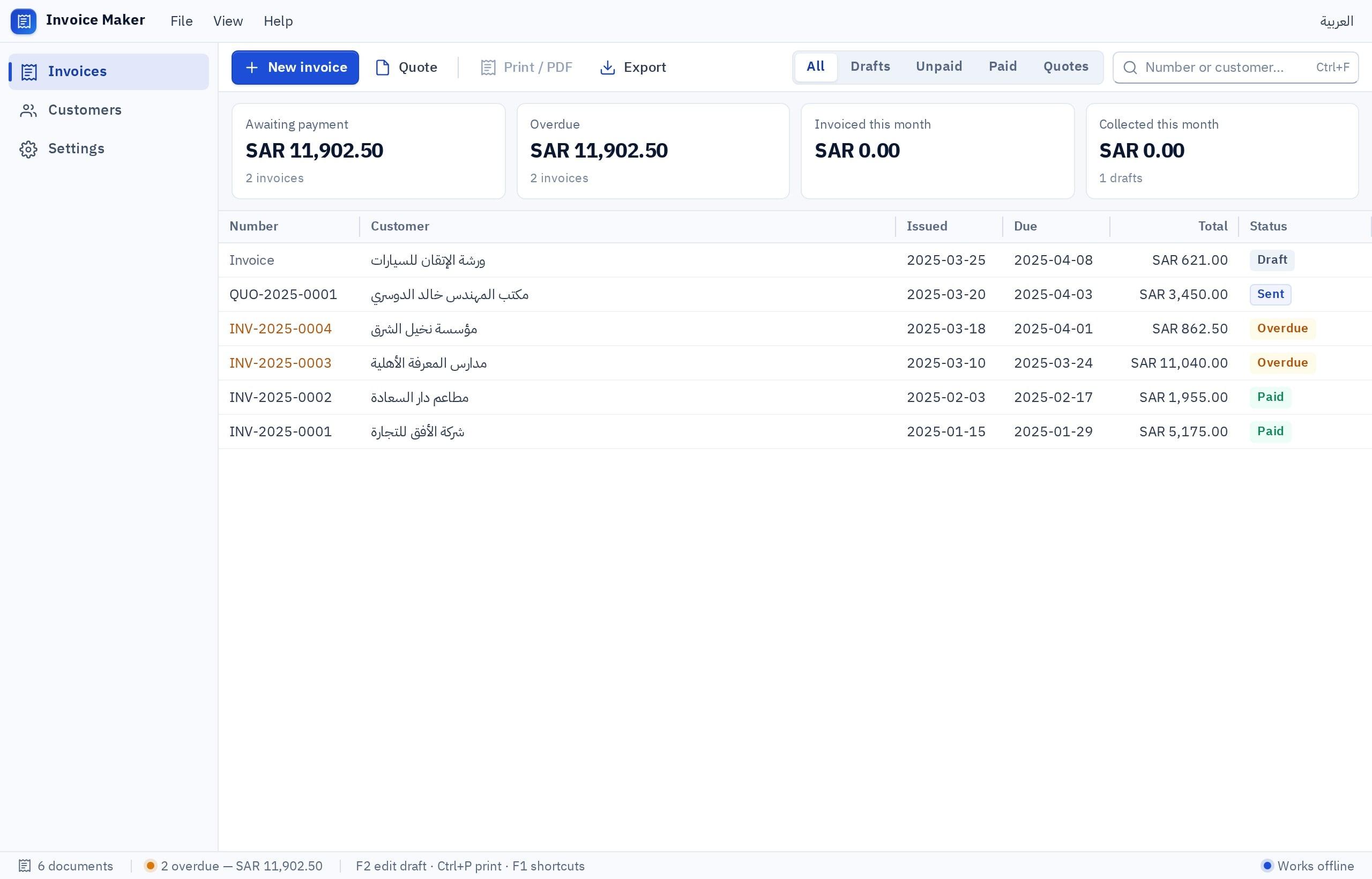
- 12. Invoice maker. For a freelancer or service office: 'Customers, line items with quantity, price and tax, automatic numbering, an unpaid list, and A4 printing or PDF.'
- 13. Quotations. For a workshop or contractor sending many quotes: 'Quotations: customer, line items, validity, status (sent, accepted, rejected), and one click to turn an accepted quote into an invoice.'
- 14. Petty cash and expenses. For an accountant tracking many small expenses: 'Expenses in categories, a receipt photo, the float balance after each payment, and a monthly report exported to a file.'
- 15. Staff attendance. For an office with no fingerprint device: 'Each employee checks in and out with a code and PIN on the office PC, with a monthly report of hours and lateness.'
- 16. Contract and document archive. For an office lost among licenses and expiry dates: 'A document register: type, party, expiry date, the file attached, and a list of everything expiring within 30 days.'
- 17. Rent ledger. For a small real-estate office or building owner: 'Units and tenants, rent and due date, payments recorded, overdue tenants, and a printable receipt voucher.'
What are the program ideas for warehouses, workshops and distribution?
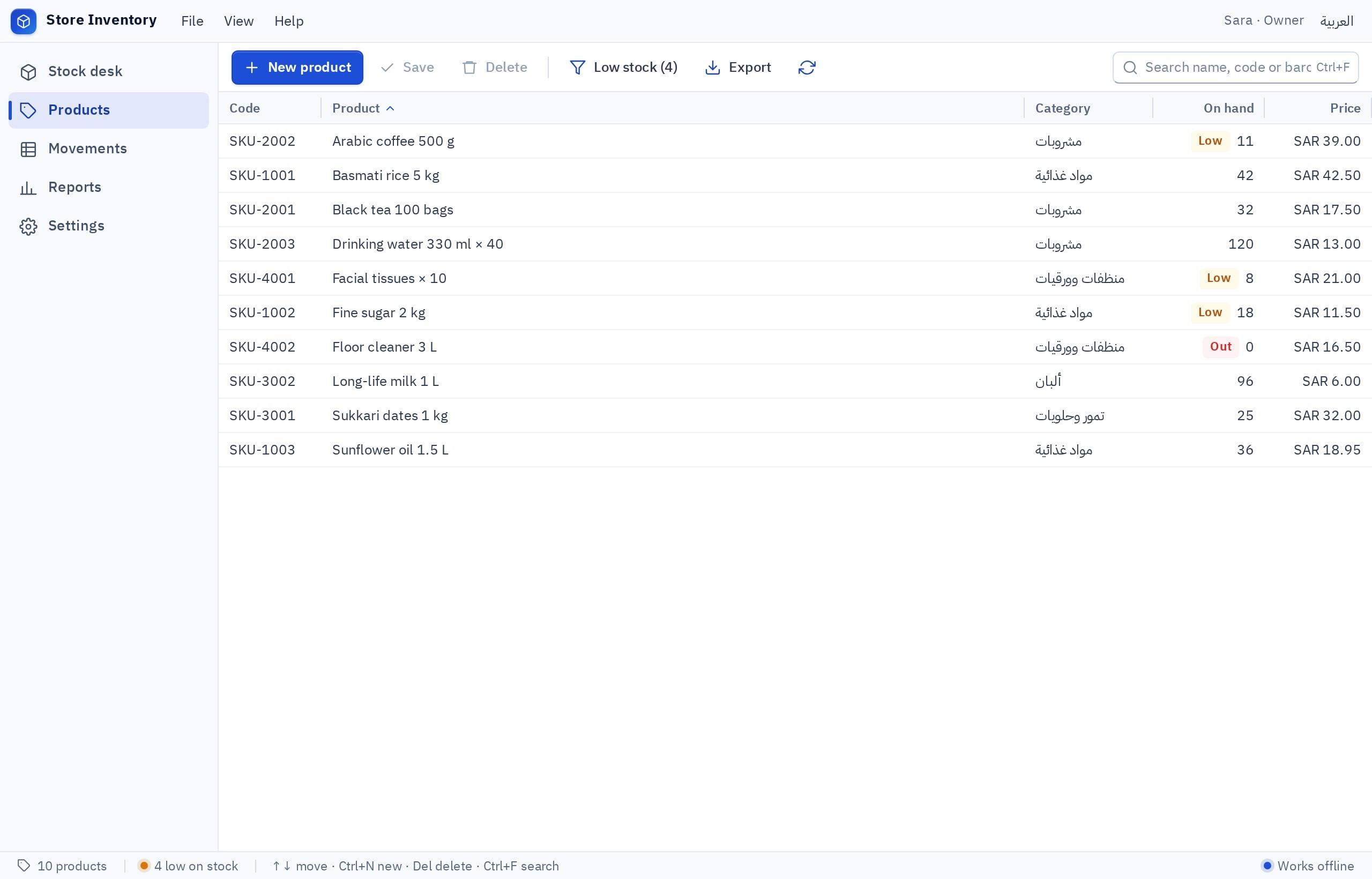
- 18. Shop or warehouse inventory. For knowing what is in stock without a manual count: 'Items with barcodes and quantities, receiving, issuing and adjusting with a reason, a low-stock alert, and a monthly report.'
- 19. Warehouse barcode labels. For goods that arrive unlabeled: 'I import items from a file, pick a barcode label template, and print a batch with copies per item.'
- 20. Delivery notes. For a distributor delivering to shops: 'A delivery note: customer, items and quantities, driver, date, two printed copies, and a list of notes the customer has not yet confirmed.'
- 21. Equipment and maintenance register. For a workshop with equipment on a service schedule: 'Equipment with number and location, service history, next service date, and a list of what is due this month.'
Here several employees often work from several PCs. Write that the PCs must see the same quantities, so cloud data is chosen. See an inventory program for your shop.
What are the program ideas for education and personal use?
- 22. Training center registration. For a course center or Quran study circle: 'Students and courses, enrollment, fees paid and outstanding, a printable attendance sheet, and a payment receipt.'
- 23. Teacher's gradebook. For a tutor or class teacher: 'Students and subjects, test marks, the average, and a printable report per student for the parent.'
- 24. Small library lending. For a school, mosque or neighborhood library: 'Books with numbers, borrowers, lending and returning by barcode, and a list of overdue books.'
- 25. My file organizer. For anyone with scattered documents: 'I add my important files, arrange them in folders and tags, search and filter by type, and find duplicates.'
These four make good first projects for a student: small, clear, with a real user to ask.
How do I turn one of these ideas into a real program?
The short prompt under each idea is enough to start, not to finish. What separates generic software from a program that looks like your shop is the detail nobody else knows. See how idea 5 grows once your own work is added:
I want a Windows program in Arabic and English for the credit ledger of a neighborhood grocery. Customers: name, mobile, house number, credit limit. Each customer has movements: a credit purchase with amount and note, or a payment. The balance is calculated automatically and shown in red when it passes the limit. A main screen with quick search by name or mobile and two large buttons: purchase and payment. A customer statement between two dates, printable on A4 or as a receipt. Reports: total debt, the ten largest balances, and anyone who has not paid for 30 days. F2 focuses search. It runs on one PC without internet, with backup and restore.
Try it in Fanann- 1Start from the prompt or a template
Eight of these ideas have ready templates to adapt.
- 2Try it with last week's numbers
Not made-up data. Mistakes show up with real cases.
- 3Choose where the data lives
One PC: local. Several PCs, one set of records: cloud.
- 4Download, install and test printing
On the actual PC and printer.
Which ideas are a poor fit for a Windows program?
Knowing what does not fit saves weeks:
| Idea | Why it does not fit | Alternative |
|---|---|---|
| An app customers order from on their phones | Customers do not install Windows software | A web or mobile app |
| A cashier linked to the card terminal | No built-in link to card terminals | Record the payment method by hand |
| Attendance with a fingerprint device | No connection to fingerprint devices | A code and PIN on the PC |
| A program for Mac | 64-bit Windows 10 and 11 only | A web app |
| Running in the background at startup | Not available today | Open it when needed |
| Shared records that work offline | The two do not combine today | Pick the more important one |
Pick the one that sounds like you to see the advice.
Start with the idea that replaces the notebook you open most. A small version on one PC, then expand.
Pick a sector whose owners you know and build for one of them first. See how to sell a program you made and starting a small software business in the Gulf.
Take an idea from the education and personal section: small enough to finish, real enough to learn from.
Do not hunt for a brilliant idea. Find a notebook that is opened every day and ask its owner what annoys them about it.
Key takeaways
- A good idea starts from a notebook or Excel file opened every day that causes a mistake every week.
- Pick a program for a specific person on a specific PC, not 'a system for everything'.
- Most of these ideas run on one PC with a local database and no internet.
- Know the limits first: no link to card terminals or fingerprint devices, and barcodes need scanners that type like a keyboard.
- Try the idea in your own shop first. A program that solved your problem is the easiest to show others.
Frequently asked questions
What is the best Windows program idea for a small shop?
Can I build these programs with no programming experience?
Do these programs work without internet?
Can I sell a program I built to other shops?
Do these programs support a barcode scanner and a printer?
How many of these ideas have a ready template?
Ask your AI assistant about this
Copy this prompt into the AI assistant you use, then add the details of your own case.
I am reading this guide: “25 Windows program ideas that small businesses actually pay for” https://fanann.com/en/blog/windows-program-ideas-small-business/ My question: Windows program ideas for small business Use that page as a source and explain the answer step by step for my situation, tell me what to check before I start, and cite the page link.