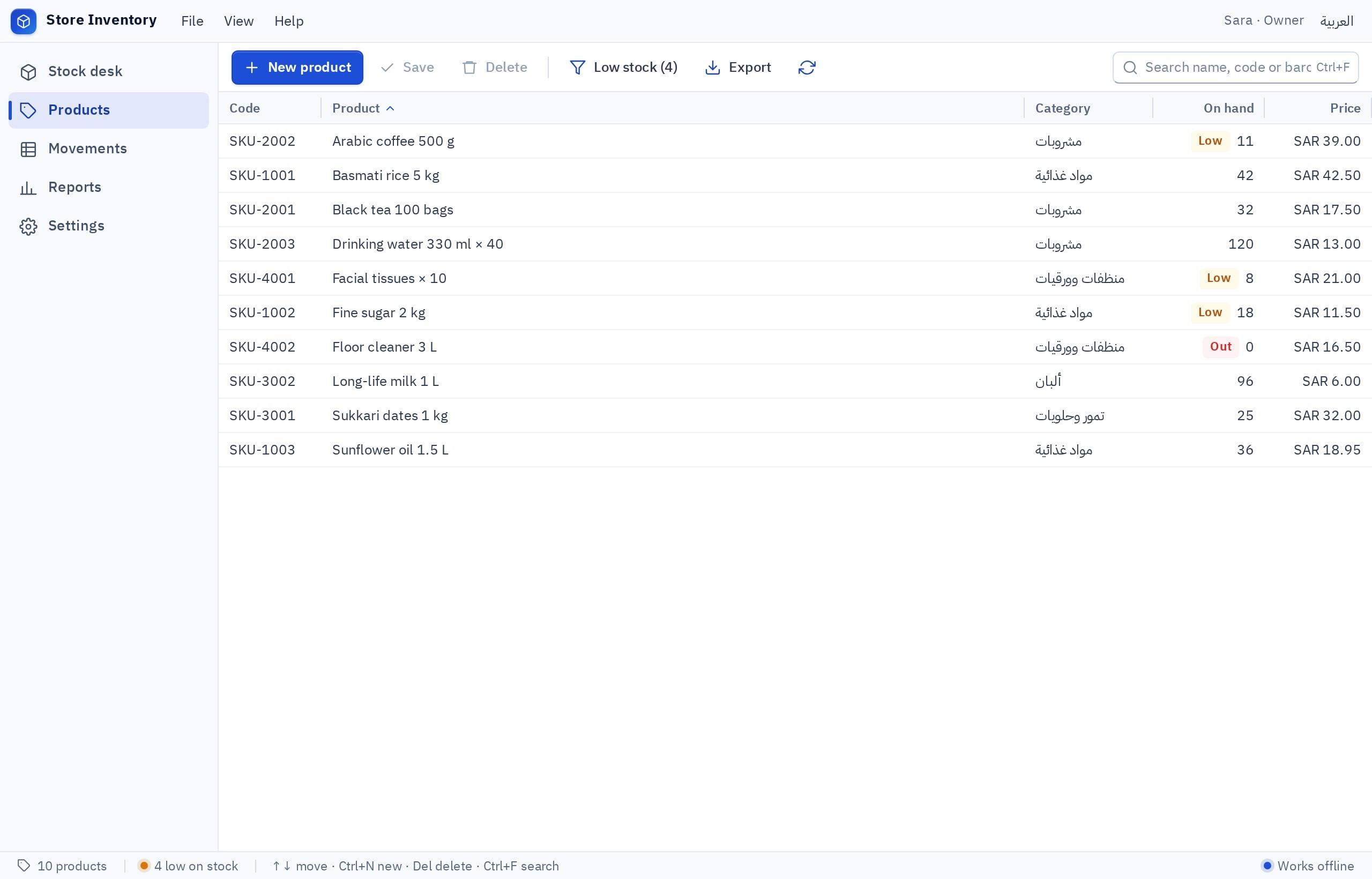
An inventory program rests on two ideas: an item list where each item has a code, a quantity and a minimum level, and a movement log that is never deleted (receive, sell, adjust, damaged) from which the current quantity is calculated. Add a low-stock alert and a monthly report and the core is complete. Ready-made software suits those who want full accounting; building suits a specific way of storing or pricing. In Fanann you start from the Retail inventory template, change it in plain words, and download a Windows program that works with barcode scanners that type like a keyboard.
- inventory program for shop
- how to make an inventory program
- inventory software for pc that works offline
- simple warehouse stock program with barcode
- how do I track stock in my shop
- excel alternative for inventory management
When do I need an inventory program instead of a notebook or Excel?
The clearest sign: the notebook says 12 pieces, the shelf holds 7, and nobody knows where five went or when. A notebook and Excel record only the latest number. An inventory program records every movement that led to it.
 Illustration
- A customer asks for an item and the salesperson says “I think we have it”, then walks off to check.
- You learn a popular item ran out after it ran out, not before.
- One Excel file is edited by three people, each with their own copy.
- Stock has been sitting for months and you do not know its value.
- The annual count takes days and ends with gaps nobody can explain.
Two or more of these and it is time. If you are still unsure, read signs your business has outgrown Excel.
What must an inventory program record?
| Data | Examples | Why it matters |
|---|---|---|
| Item | Name, code or barcode, category, unit (piece, carton, kilo) | A unique code stops one item living under two names |
| Two prices | Cost price and selling price | To know your stock value and your margin |
| Quantity and minimum | Current quantity, reorder level | The basis of the low-stock alert |
| Location | Shelf, warehouse or branch | Cuts search time in a large stock room |
| Supplier | Name, mobile, lead time | So you order early enough |
| Movement | Type, quantity, date, who did it, note | The log that explains every number |
How does stock move through the program on a normal day?
Everything that happens in a stock room is one of five movements. A program that handles them well is enough for most small shops and warehouses:
- 1Receive
A delivery arrives. Scan the barcode or search by name, enter quantity and cost price. The quantity rises and the program keeps who received it and when.
- 2Issue or sell
Goods leave for a sale, a branch or a workshop. The quantity drops and the destination is recorded.
- 3Return
Goods come back from a customer or go back to the supplier. Two different movements, so keep them apart.
- 4Damaged or expired
Something broke or passed its date. Stock drops with a written reason and shows up in the waste report.
- 5Count adjustment
You count the shelf, enter the number, and the program records the gap as an adjustment instead of erasing history.
Which reports are worth opening every week?
| Report | The question it answers | What you do with it |
|---|---|---|
| Items below minimum | What do I order today? | A ready purchase list per supplier |
| Stock value | How much money is frozen on shelves? | Buying and clearance decisions |
| Slow movers | What has not moved in 90 days? | Promote, discount or stop ordering |
| Item movement | Where did these pieces go? | Explains any gap in a count |
| Waste and damage | How much do I lose, in which category? | Change storage or order sizes |
| Count variances | How far apart are books and shelves? | Follow-up and accountability |
Six reports are enough. Every extra report nobody opens is one more screen to confuse staff. If your accountant needs the numbers, ask for an export button to a file that opens in Excel.
Should I buy inventory software or build it?
Ready-made inventory software is plentiful, often as part of a full accounting package. That is its strength and its weakness: you get everything, and you pay for and learn everything.
Pick the one that sounds like you to see the advice.
Journals, a trial balance, tax filing links: buy accounting software that includes stock. Building full accounting from zero is not a wise start.
Items, movements, an alert, a report: a simple program built to fit is enough, and you learn it in an hour.
Sizes and colors, selling by the meter or by weight, spare parts with manufacturer numbers, expiry dates: building gives you the fields you need and none you do not.
You need shared data, permissions and transfers between locations. Compare a ready multi-branch system with a built program on cloud data.
- An ongoing subscription that usually grows with users
- Many screens you do not need
- Your business adapts to the software, not the reverse
- Your data sits with the vendor, in the format they offer
- Your time describing, testing and adjusting
- You test the hardware and own the backups
- No phone support from a hardware supplier
- What you do not ask for will not be there, so define your needs well
Do I need a barcode scanner, and how does it work with the program?
Past a hundred or two hundred items, yes. A scanner cuts the search to a second and prevents picking a similar item by mistake. It is simpler than it looks:
- Scanner type
- USB that types the code like a keyboard, the common kind
- Drivers
- Usually none: plug in and it works
- Test
- Scan into Notepad: a number means it is ready
- Items with no barcode
- Print your own labels with internal codes
The program keeps a search field always in focus: scan, the item appears, type the quantity, press Enter. For items without a factory barcode, such as goods you pack yourself or spare parts, see printing barcode labels.
One PC in the stock room, or several PCs seeing the same quantity?
| Situation | The fitting choice | Why |
|---|---|---|
| One stock room, one person recording | Local database | Works offline and needs no sign-in |
| Storekeeper, salesperson and manager on different PCs | Cloud database | They must see the same quantity at the same moment |
| Remote warehouse, weak internet | Local with a daily backup | Relying on a patchy connection stops work |
| Two branches exchanging goods | Cloud | Transfers between branches need one record |
Remember that shared data always needs internet. More in local or cloud database and software that works offline.
How do I build the inventory program with Fanann?
Fanann has a ready Retail inventory template: products with codes and quantities, a field where a scanned barcode opens the item, adjustments that leave a history, and stock reports. Open it in Windows Studio, try it inside a Windows-style window in your browser, then ask for what is specific to you.
I want an inventory program for a car spare parts shop, in Arabic (right to left) with English. Each item has: name, part number, barcode, brand, compatible cars, shelf location, cost price and selling price, quantity and a minimum level. A search field that is always in focus and accepts a barcode scan or typing a part number or name. Movements: receive from supplier, issue, customer return, return to supplier, damaged, and count adjustment. Every movement stores the user, the date and a note, and movements cannot be deleted. Quantity changes only through a movement. Items below their minimum are shown in red, with a To order screen grouped by supplier. Reports: stock value, items with no movement in 90 days, item movement, count variances, all exportable to a file. Two users: storekeeper and manager, with adjustments reserved for the manager. Backup to a file and restore.
Try it in FanannIf your items live in an Excel file, say in your request that you want to import them from a file. If what you want is a web system that also opens on a phone, that is a different route, covered in build an inventory management app.
How do I switch to the program without stopping work?
- Day 1Clean the item list
Unify names, delete duplicates and give every item one code. The heaviest step and the most important.
- Day 2Opening count
Count physically and enter quantities as an opening balance movement. Do not copy old notebook numbers as they are.
- Week 1Run both
Record in the program and in your old method together, and compare at the end of each day.
- Week 2Minimum levels
Once you see real movement, set reorder levels for your top fifty items first.
- Month 1First cycle count
Count one category and compare it with the program. A small gap shows the discipline is working.
Key takeaways
- Never edit a quantity directly: every change is a movement recorded with a name and a reason.
- A minimum level per item turns the program from a record into an alarm that protects you from stockouts.
- One PC in the stock room is fine with local data. Several people on different PCs need cloud data.
- Start with one careful physical count, because software cannot correct wrong numbers you typed in.
- A barcode scanner saves time and prevents typing errors, provided you test it with your own codes.
Frequently asked questions
How do I make an inventory program for my shop?
Is Excel enough for inventory management?
Does an inventory program work without internet?
Which barcode scanner works with the program?
Is stock deducted automatically when the cashier sells?
What if the PC running the program breaks down?
Ask your AI assistant about this
Copy this prompt into the AI assistant you use, then add the details of your own case.
I am reading this guide: “How to make an inventory program for your shop or warehouse” https://fanann.com/en/blog/inventory-program-for-shop/ My question: inventory program for shop Use that page as a source and explain the answer step by step for my situation, tell me what to check before I start, and cite the page link.