An invoicing program stores your customers and items or services, creates an invoice with a sequential number, works out the total and tax, prints it or saves it as a PDF, and keeps it in a searchable record that shows what is still unpaid. You can buy ready-made software or build your own: Fanann has an Invoice maker template you change by describing, then download as a Windows program that works offline on your PC. A built program shows VAT on the invoice, but official e-invoicing requirements in your country are yours to verify with the official source or your accountant.
- invoicing program for computer
- how to make an invoice program
- invoice software that works offline
- simple invoice maker for pc with vat
- how do I create invoices and save them as pdf
- invoice and quotation software for small office
Do I need an invoicing program, or are Word and Excel enough?
 Illustration
A Word or Excel template is reasonable while invoices are few. The strain starts when you ask questions a file cannot answer: what was the last invoice number? Did I bill this customer last month? Who has not paid? What did I sell this quarter before and after tax?
- One file per invoice, searching by file name
- You remember the next number, and it may repeat
- A formula deleted by accident changes the total
- It cannot tell paid from unpaid
- Customer details retyped every time
- One record searchable by customer, number or date
- Automatic sequential numbering
- Fixed calculation the user cannot break
- A status per invoice: draft, issued, paid, overdue
- Pick the customer and the details fill in
A working rule: past twenty invoices a month, or once customers pay on credit, a program saves more than it costs.
What must the invoice itself contain?
| Part | What goes in it | Note |
|---|---|---|
| Your details | Business name, address, commercial registration, VAT number if any | Entered once in settings |
| Customer details | Name, address, their VAT number if a business | From the saved customer list |
| Header | The word Invoice or Tax invoice, sequential number, issue date | No gaps and no repeats |
| Line items | Description, quantity, unit price, discount | Saved items or services, plus free text |
| Totals | Subtotal before tax, tax rate and amount, grand total | Calculated, never typed |
| Footer | Payment terms, bank account, notes | Fixed text repeated on every invoice |
Which screens does an invoicing program need, and how does work flow?
Invoicing is calmer than a cashier: no queue, and the user sits at a desk. So it needs clear tables and fast search more than big buttons:
- 1Customers
A list with name, mobile, address and VAT number, plus each customer's balance: owed and paid.
- 2Items and services
What you sell, with a default price and tax rate, so you do not retype descriptions.
- 3New invoice
Pick the customer, add lines, watch the total update, save as draft or issue.
- 4Invoice list
A table sorted and filtered by status, date and customer, where you reprint or record a payment.
- 5Unpaid
Outstanding invoices, oldest first, with days overdue. Open it every morning.
- 6Reports
Monthly or quarterly sales before and after tax, total VAT, and top customers.
How do I handle numbering, quotes, corrections and payments?
These four details separate dependable software from a good-looking template:
- Numbering: one sequence that never goes back, with a prefix if you like (INV-2026-0001). A draft gets no number until issued.
- Quotes: a separate document with its own numbering that becomes an invoice in one press when the customer agrees.
- Corrections: an issued invoice is not deleted. You issue a credit note linked to it, so the trail stays clear for you and your accountant.
- Payments: one invoice may be paid in two parts. Record each payment with its date and method, and the program works out the balance.
What about VAT and e-invoicing?
Precision matters here, because two things are often confused: an invoice that shows VAT, and a business that complies with its country's e-invoicing system.
| Country | Standard rate | What to verify |
|---|---|---|
| Saudi Arabia | 15% VAT | ZATCA's e-invoicing (Fatoora) requirements, and whether your business is in an integration wave |
| UAE | 5% VAT | Tax invoice requirements and e-invoicing guidance from the Federal Tax Authority |
| Other countries | Varies | The local tax authority and your accountant |
Plain-language detail: ZATCA e-invoicing phases and UAE tax invoice requirements.
Should I buy invoicing software or build my own?
Pick the one that sounds like you to see the advice.
Choose a ready solution that meets your tax authority's requirements. You can still build internal tools beside it, such as quotes and collection follow-up.
Few invoices, known customers, your own look and data on your PC: building from a template is enough and stays yours.
Hourly or per-meter pricing, parts and labor lines, a deposit then the balance: off-the-shelf templates squeeze you, building gives you your fields.
Journals, balance sheet and filings: buy accounting software. An invoicing program alone is not an accounting system.
If your invoices are issued at the counter with every sale, you need a cashier, not desk invoicing: a cashier program for a PC.
How does it print and save PDFs, and where does the data stay?
- Printing
- Any printer installed in Windows, on A4
- Save as PDF
- From the Windows print dialog itself
- Sending
- Attach the PDF to email or WhatsApp
- Data
- Local on the PC, or shared in the cloud
- Backup
- A file you save and restore when needed
For one person invoicing from their own PC, local data is the natural choice: no internet, no sign-in. If an accountant and a sales rep work on two PCs and must see the same invoices, choose the cloud database. The difference is explained in local or cloud database.
How do I build the invoicing program with Fanann?
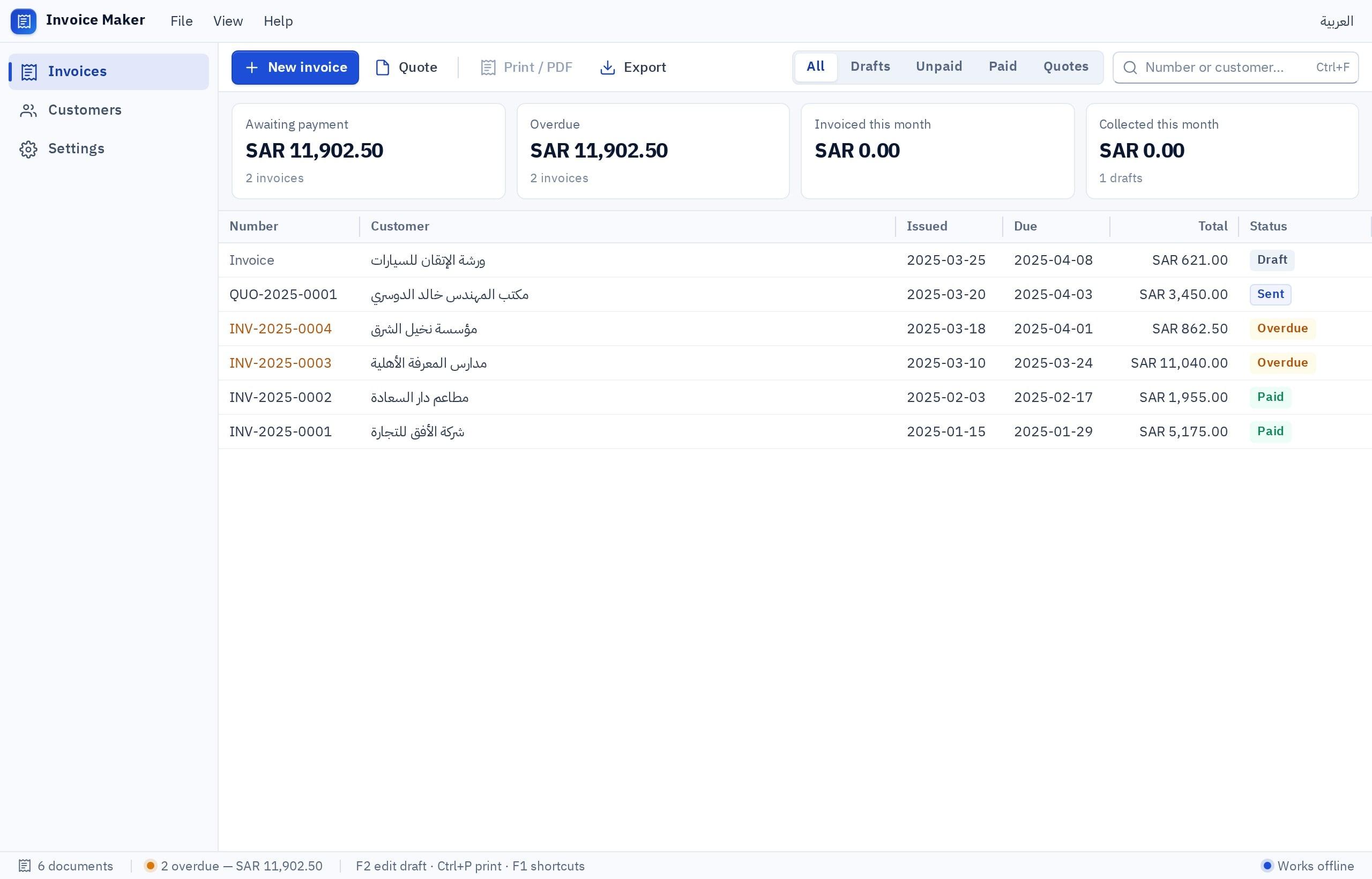
Fanann has a Standalone invoice maker template: customers, line items with quantity, price and tax, saved invoices, and A4 printing or saving as PDF. Open it from the Windows app templates, try it in your browser inside a Windows-style window, and ask for what is missing by typing or speaking.
I want an invoicing program for an air-conditioning maintenance office, in Arabic (right to left) with an English version of the invoice. A customer list (individuals, and businesses with a VAT number). A list of services and parts with default prices. New invoice: I pick the customer and add lines of two types (labor, parts) with quantity, price and discount, and 15% VAT is calculated on its own line with the grand total. Automatic numbering as INV-2026-0001 that never repeats, with drafts unnumbered. After issue the invoice is read-only, and corrections are made with a linked credit note. Quotes with separate numbering that convert to an invoice in one press. Partial payments recorded with date and method. An Unpaid screen sorted oldest first with days overdue. A4 printing with the office logo, VAT number and bank account in the footer, and save as PDF. A monthly report of sales before tax, VAT and total, exportable to a file. Backup and restore.
Try it in FanannFor every step from idea to installer, see how to create an .exe program without programming.
What should I review before sending the first invoice?
An invoice is not a sheet you print. It is a line in a record you must be able to find three years from now.
Key takeaways
- An invoicing program is worth three things: numbering that never breaks, math that never slips, and a record where any invoice is found in seconds.
- An issued invoice is never deleted or edited. It is corrected with a credit note, so ask for that from the first version.
- Showing VAT on an invoice is one thing. Meeting e-invoicing rules is another, and you verify it yourself.
- One person on one PC is fine with local data and a regular backup.
- The unpaid list is the screen that brings your money back, so never build without it.
Frequently asked questions
How do I make an invoicing program on my computer?
Is there an invoicing program that works without internet?
Is a built program certified for e-invoicing?
How do I save an invoice as a PDF and send it?
Can I add my logo and change the invoice layout?
What is the difference between invoicing and accounting software?
Ask your AI assistant about this
Copy this prompt into the AI assistant you use, then add the details of your own case.
I am reading this guide: “How to make an invoicing program for your computer” https://fanann.com/en/blog/invoice-program-for-computer/ My question: invoicing program for computer Use that page as a source and explain the answer step by step for my situation, tell me what to check before I start, and cite the page link.