Oman has applied VAT at a standard rate of 5% since April 2021, administered by the Tax Authority. If your business is registered, every tax invoice needs your name, address and VAT registration number, a sequential number that never repeats, the date, a description of the goods or services, the amount before tax, the VAT rate and amount, and the total in Omani rials with three decimals. Good invoice software calculates all of this and issues a credit note instead of editing a sent invoice. Whether your invoice meets the official requirements is something to confirm with the Tax Authority or your accountant.
- VAT invoice Oman
- invoice software Oman
- tax invoice requirements Oman
- invoice builder with VAT in Omani rial
- how to calculate VAT in Oman
- e-invoicing Oman
Do my invoices need to show VAT in Oman?
The short answer: if your business is registered for VAT, yes. Since April 2021 the Sultanate of Oman has applied VAT at its standard rate on most goods and services, administered by the Tax Authority. A registered business collects the tax from customers on every taxable sale, shows it on the invoice, and files its returns on time.
If you are not registered yet, the first question is not what the invoice looks like but whether your sales have passed the threshold that makes registration mandatory. The Tax Authority sets that threshold, along with a lower one for voluntary registration. We are not quoting figures here, because the only reliable reference is the Authority's official site on the day you read this.
 Illustration
- Tax
- VAT at a standard 5%
- Since
- April 2021
- Authority
- The Tax Authority
- Currency
- Omani rial = 1,000 baisa
- E-invoicing
- Plans announced; follow official updates
What must a tax invoice in Oman contain?
The table below sums up what a tax invoice usually includes, with a practical note on how invoice software handles each item. Use it as a checklist, not as a substitute for the official text.
| Detail | Practical note in the software |
|---|---|
| The words Tax Invoice | A clear heading at the top, in Arabic and optionally English |
| Supplier name and address | Entered once in settings, as on the commercial registration |
| Supplier VAT registration number | Shown automatically on every invoice |
| Customer name, address and VAT number if registered | Stored on the customer card, not retyped each time |
| Sequential invoice number | Generated by the software; never repeats, goes back or gets deleted |
| Issue date, and supply date if different | Two separate fields on the invoice |
| Description, quantity and unit price | Picked from the item or service list |
| Amount before tax | Per line and in total |
| VAT rate and amount | On its own line, in rials with three decimals |
| Total payable including VAT | The most prominent number on the invoice |
For the broader basics of invoicing and the pitfalls of Word and Excel templates, see the invoice software guide.
How do I calculate VAT in Omani rials without rounding errors?
The Omani rial divides into 1,000 baisa, so amounts are written with three decimals, such as 12.350 rials. Many generic templates and programs are designed for currencies with two decimals, so they round or truncate the baisa, and a small gap appears between the sum of the lines and the total. A small gap on one invoice becomes a reconciliation headache at month end.
- Three decimals everywhere: in the unit price, the VAT amount, the total, and the reports too.
- One rounding rule: agree with your accountant whether VAT is calculated per line and then summed, or on the invoice total, and stick to it.
- Inclusive and exclusive prices: if your prices include VAT, the software extracts the tax from the price instead of adding it on top.
- Exempt or zero-rated items: if you have any, each item gets a rate field and the software shows each rate on its own line.
- Other currencies: if you invoice a Gulf customer in their currency, store the exchange rate used on the invoice.
An example for illustration only: a service priced at 40.000 rials before VAT carries 2.000 rials of VAT, for a total of 42.000 rials. If the price is 42.000 rials including VAT, the amount before tax is 40.000 and the VAT 2.000. The software must give the same result both ways. For showing prices in several Gulf currencies, see multi-currency checkout across the GCC.
How do I correct an invoice I sent by mistake?
The rule your software should enforce: an issued invoice is never edited or deleted. If you got a quantity or price wrong, the customer returned part of the goods, or you granted a discount after the sale, the correction is a new document that refers to the original invoice.
- Reduces the amount the customer owes
- For returns, later discounts and overcharges
- Reduces the VAT you owe by the same proportion
- Has its own sequential number and cites the invoice number
- Increases the amount the customer owes
- For undercharges or fees added after the invoice
- Increases the VAT due by the same proportion
- Has its own sequential number and cites the invoice number
If your current program, or the Excel file you work from, lets you open an old invoice and change its numbers, that alone is a reason to move to a system. An edit log and user permissions protect you in any review.
What does invoice software need for a company in Oman?
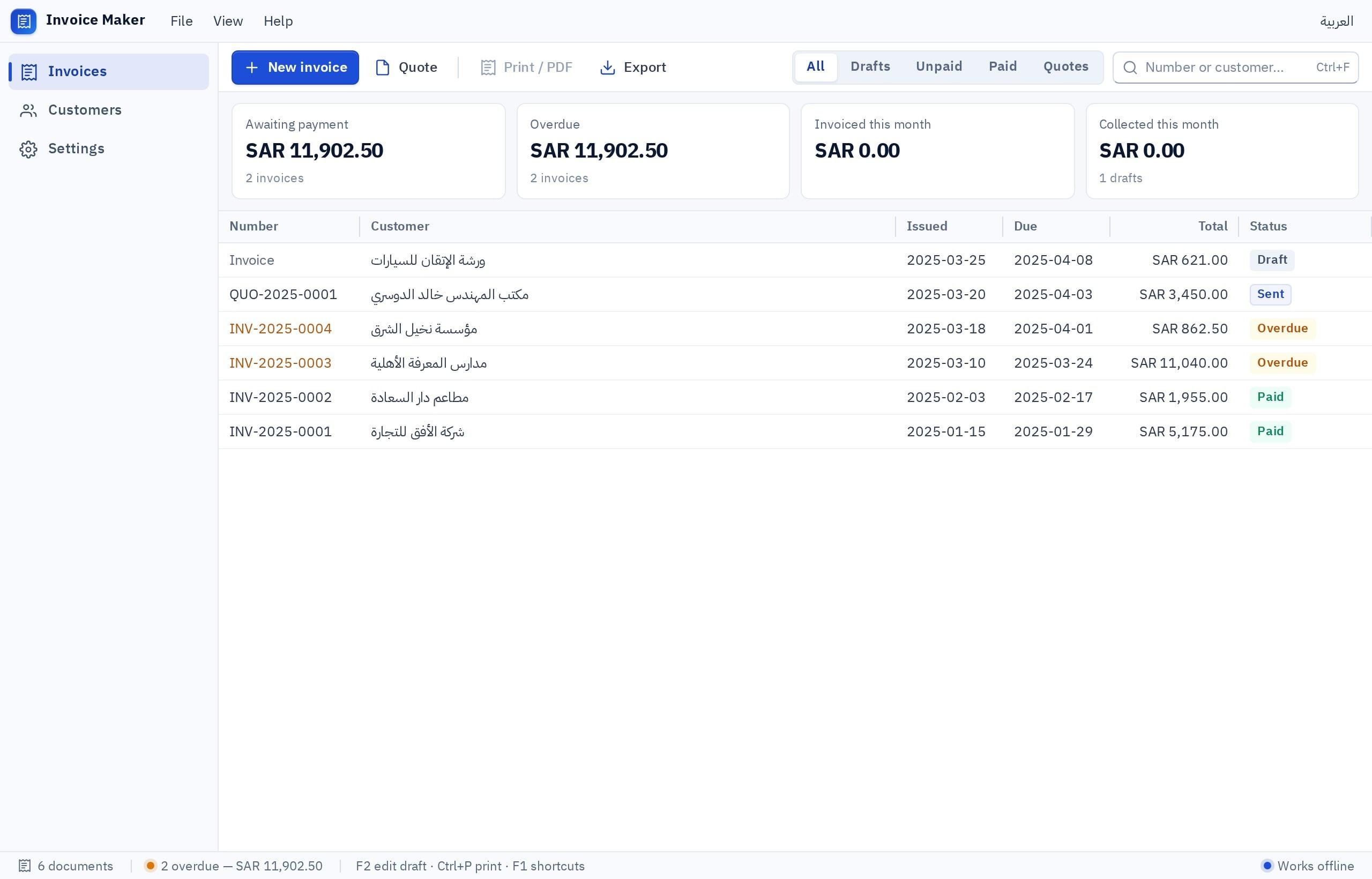
If you only need invoicing, start with invoice software. If you want journal entries, a trial balance, customers and suppliers together, accounting software with invoicing inside it fits better. For a shop with a till issuing quick receipts, see the POS software builder.
Ready-made invoice software or software built around how you work?
In Oman, as across the Gulf, there is plenty of ready-made invoicing and accounting software. The right question is not which one is best known, but which one matches how you work without you working around it every day, and software built in Fanann matches it by design.
Pick the one that sounds like you to see the advice.
Start from the Fanann invoice template and you have it in minutes, with your own layout and no per-user subscription. What matters is the numbering, the VAT and the credit note, and the template already covers them.
You need customer balances, statements and overdue reminders. Building gives you your exact price lists instead of approximating them in generic software.
Progress invoices, completion percentages and retentions. Generic templates usually fall short here, and building around your process pays off.
Shared cloud data, permissions and access for the accountant. Build it in Fanann on cloud data: every branch issues from one sequence, each role sees only its screens, and the accountant gets their own access.
How much does a system like this cost compared with a development firm? Try the app cost calculator, and see how building with Fanann compares with hiring an app development company.
How do I build invoice software with Omani VAT in Fanann?
You describe how you invoice in Arabic or English, or upload the invoice template you use in Excel, and Fanann builds the invoice software with its screens and reports. You try it with your own data before relying on it. It runs on the web and phones, or as a program on a Windows PC.
I want invoice software for a maintenance company in Muscat, in Arabic with the option to print invoices in Arabic and English. Company details in settings: name, address, commercial registration number, VAT registration number and logo. A card for each customer with name, address and VAT number if any. The invoice is headed Tax Invoice, with an automatic sequential number that cannot be edited, the issue date and supply date, service lines with quantity and price, the amount before tax, 5% VAT on its own line, and the total in Omani rials with three decimals. An option for VAT-inclusive prices. Credit and debit notes that each refer to the invoice number. Payment status: paid, partial, overdue, with reminders for overdue invoices. A monthly report of sales and VAT collected. Permissions: the accountant issues and reverses with a note, staff can only issue. Export to Excel.
Try it in FanannWhat about e-invoicing in Oman?
The Tax Authority has announced plans to introduce e-invoicing in the Sultanate. The phases, which businesses are covered, the dates and the technical requirements are published by the Authority, and we will not quote dates we have not verified. The right move now is to follow its announcements and ask any software provider about their plan once the requirements are clear.
- 1Clean up your data today
Correct VAT numbers for registered customers, items with stable names and a clean invoice sequence. Any e-invoicing system will need these.
- 2Follow the official source
Tax Authority announcements are the reference for phases and dates, not posts that circulate online.
- 3Ask your accountant about your business
When your business will be covered and what changes in your invoice cycle.
- 4Review your software when the rules land
Does it need an integration or new fields? Software built around you is changed by describing the change.
More guides for businesses in the Sultanate are in the Oman market guide, and for your city see Fanann in Muscat. For comparison with a Gulf neighbor: VAT for online sellers in the UAE.
A correct invoice is written once. A mistake on it is fixed with a new document, not an eraser.
Key takeaways
- VAT in Oman has a standard rate of 5%, and the mandatory registration threshold is set by the Tax Authority, so check the current figure at the source.
- A tax invoice has required details, chief among them the VAT number, the sequence and the VAT amount on a clear line.
- The Omani rial divides into 1,000 baisa, so the software must calculate and round to three decimals.
- A sent invoice is never edited: mistakes are fixed with a credit or debit note that refers to it.
- The Tax Authority has announced plans for e-invoicing, so follow its official announcements before committing to any long-term software.
Frequently asked questions
What is the VAT rate in Oman?
When do I have to register for VAT in Oman?
What is the best invoice software in Oman?
Is an Excel invoice template enough after VAT?
Is Fanann approved by the Oman Tax Authority?
Is e-invoicing mandatory in Oman?
Ask your AI assistant about this
Copy this prompt into the AI assistant you use, then add the details of your own case.
I am reading this guide: “Invoices and VAT in Oman: what your invoice software needs” https://fanann.com/en/blog/vat-invoicing-oman/ My question: VAT invoice Oman Use that page as a source and explain the answer step by step for my situation, tell me what to check before I start, and cite the page link.