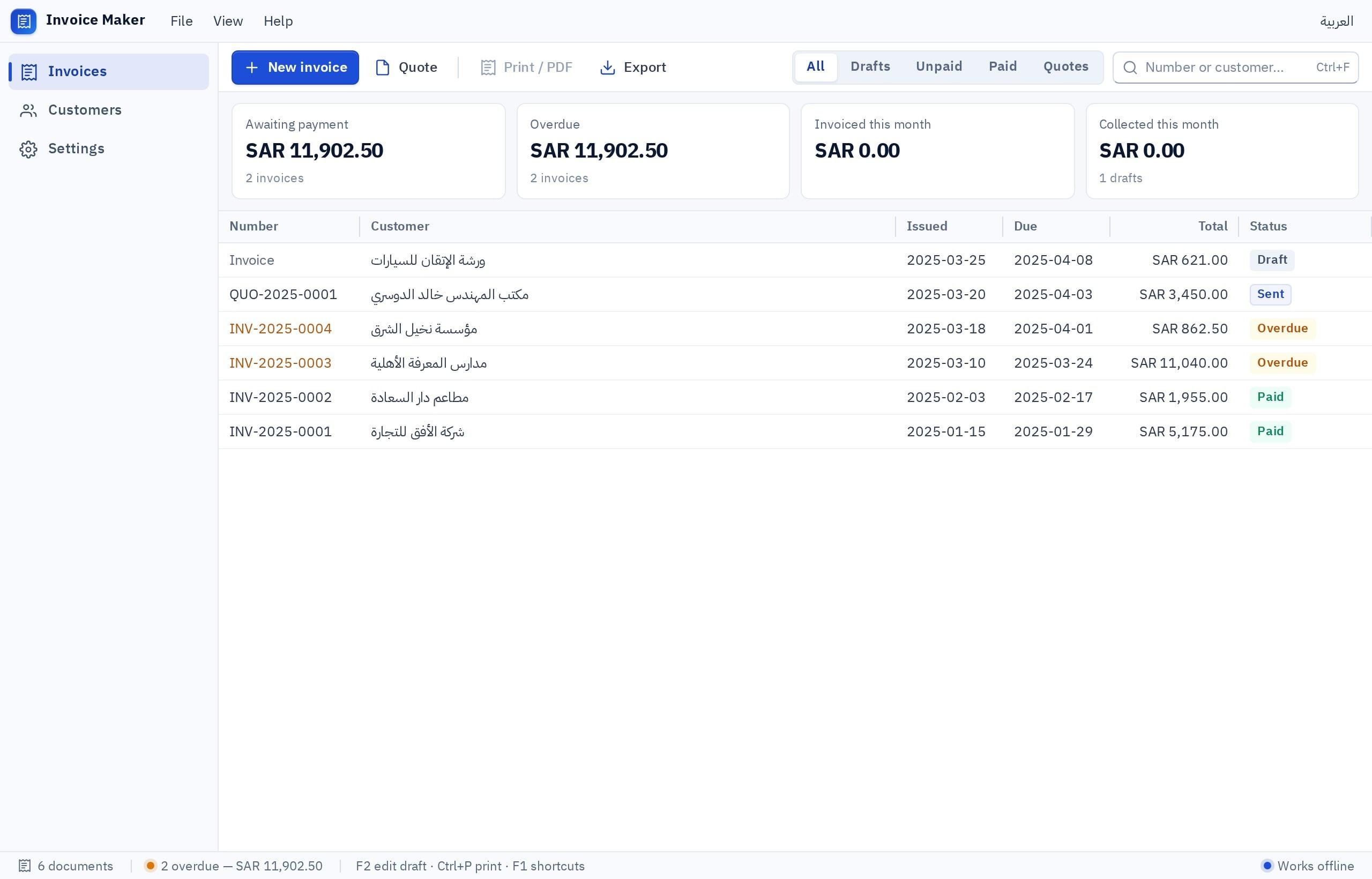
Invoice software issues every invoice with a sequential number that never repeats, calculates tax and totals automatically, keeps each invoice with its customer and payment status, and issues a credit note instead of editing an invoice already sent. No Word or Excel template guarantees that, however polished. Tax invoice and e-invoicing rules differ between Saudi Arabia, the UAE and Egypt, so confirm your country's requirements with the official authority before choosing any software.
- invoice software
- free invoice software
- excel invoice software
- free invoice template excel
- tax invoice software
Why do I need invoice software instead of Word and Excel?
Because an invoice is not a nice-looking page but a financial record: a number that never repeats, a correct calculation and a saved copy that never changes. A Word or Excel template draws the invoice, but it does not stop duplicate numbers, edits to old invoices or lost copies. Invoice software does that automatically, and also tells you who has paid and who is late.
Most business owners start with a template, which makes sense. The trouble creeps in quietly: two invoices with the same number, a wrong total because a cell was copied without its formula, or a customer asking for an old invoice that only turns up after a long email search.
What should an invoice contain?
The mandatory details are set by your country's tax rules, but this is the structure most professional invoices share:
| Part | What it contains | What to watch |
|---|---|---|
| Seller details | Trade name, address, registration number, tax number if any | The officially registered name, not a different brand name |
| Customer details | Name, address, and the customer's tax number on business invoices | Some rules require customer details above an amount or for businesses |
| Invoice number and date | A unique sequential number, issue date, and supply date if different | No duplicates and no unexplained gaps in numbering |
| Line items | Description, quantity, unit price, discount, line total | A description the customer understands, not just an internal code |
| Tax | Rate, taxable amount, tax amount, total including tax | Round fractions the same way on every invoice |
| Payment | Payment method, due date, bank details | Invoice status: paid, partly paid, overdue |
| Notes and terms | Return policy, payment terms | Short and clear |
What goes wrong with Excel invoice software and Word templates?
- The number is typed by hand, so it repeats or skips
- An invoice already sent can be edited without a trace
- Each invoice is a separate file in a folder or an email
- You only know who paid by checking the bank statement
- Formulas break when copied and pasted
- The monthly tax summary is collected by hand
- A sequential number is generated automatically and never repeats
- An invoice locks after issue; corrections use a note
- All invoices in one list with search and filters
- Payment status on every invoice, with overdue alerts
- The calculation is identical on every invoice
- Sales and tax reports in one click
This is not to say Excel is bad. It is excellent for calculation and analysis, but it was not designed to be a record that never changes. The free Excel invoice templates found online inherit this problem no matter how many buttons they add.
What are credit and debit notes, and when do I use them?
These two documents are the professional way to correct an invoice without touching it:
- Credit note: issued for returned goods, a discount after the sale, or an error that inflated the invoice. It reduces what the customer owes and refers to the original invoice number.
- Debit note: issued when the amount must increase after the invoice, such as a forgotten item or a price difference. It also refers to the original invoice.
- Each has its own sequential numbering and counts in tax reports just like invoices.
Good invoice software issues both from the invoice screen itself, so the link between the original and the correction stays clear for anyone reviewing later.
Do e-invoicing rules differ between Saudi Arabia, the UAE and Egypt?
Yes, each country has its own system and timeline. In Saudi Arabia, e-invoicing is applied in phases and waves that set who must connect and when, explained simply in ZATCA e-invoicing phases. The UAE has an e-invoicing program rolling out to businesses in stages. Egypt has one system for e-invoices and another for e-receipts with its tax authority.
The details (who is required, the invoice format, how it is submitted, and the deadlines) change over time and depend on the size and type of business. So:
Is there free invoice software that is enough for my business?
The market has plenty of products with limited free plans, and free Excel templates. The right question is not "is it free?" but "does it cover what I need without costing me later?" If you only need an invoice or a quote now and then, try the free invoice generator, which runs in your browser with no sign-up and prints a document that is not connected to any official system.
Pick the one that sounds like you to see the advice.
An organized template or simple software is enough, as long as you number invoices in one sequence and keep a PDF of each.
You need software that stores customers and items and tracks payments. The time it saves pays for it quickly.
Start from the official requirements and pick a solution that states the connection explicitly. Price should not be your first criterion here.
Subscriptions, deposits, project invoices in stages? Software that fits you may beat a template that looks nothing like your business.
How do I build invoice software that fits my business?
With Fanann's invoice software you describe your invoice in Arabic or English: the fields it shows, numbering, tax, payment statuses and credit notes. If your invoices and customers live in Excel, upload them through Excel to app to start from your current records. For a program installed on the office PC that prints to its printer, see an invoicing program for your computer.
I want invoice software in Arabic and English for a small services company. Customers: name, address, optional tax number, mobile. Items and services with prices. The invoice: an automatic sequential number that never repeats, issue date and due date, lines with quantity, price and discount, tax at a rate I set in settings shown on its own line, total, and print and PDF export with my logo. After issue the invoice locks and cannot be edited; corrections use a credit or debit note with its own numbering that refers to the original invoice. Payment statuses: unpaid, partly paid, paid, overdue, with an overdue list. A monthly sales and tax report. Permissions: the accountant issues invoices, only the manager issues credit notes. Import customers from an Excel file.
Try it in FanannWhat should I test before sending the first invoice from the software?
- 1Issue five test invoices
Check that numbers are consecutive and that totals match your own calculation, especially with discounts and fractions.
- 2Try a credit note
Cancel part of an invoice and confirm the monthly report reflects the reduction.
- 3Print and export
Check the PDF in Arabic and English, and that the logo and numbers print clearly.
- 4Review with your accountant
Send them a sample invoice and a test month's report before full rollout, so they can confirm the fields your country requires.
If you need full accounting and not just invoices, read best accounting software for small businesses: how to choose and look at accounting software.
A professional invoice is not judged by its design but by a number that never repeats and an amount that never changes once it leaves your hands.
Key takeaways
- An invoice is never edited after issue: corrections go through a credit or debit note.
- Sequential, non-repeating numbering is the first thing lost when working from Word and Excel templates.
- Good invoice software knows who paid and who is late; it does not just print.
- E-invoicing requirements differ by country and activity and change in phases, so check them at the official source.
- If your country requires a solution connected to an official system, choose one that says so explicitly and that you can verify.
Frequently asked questions
What is the best invoice software for small businesses?
Is there free invoice software?
Does Excel invoice software work?
How do I make a professional invoice?
Is Fanann approved for e-invoicing?
What is the difference between a tax invoice and a simplified invoice?
Can I move my old invoices from Excel?
Ask your AI assistant about this
Copy this prompt into the AI assistant you use, then add the details of your own case.
I am reading this guide: “Invoice software: how to issue professional invoices instead of Word and Excel” https://fanann.com/en/blog/invoice-software-guide/ My question: invoice software Use that page as a source and explain the answer step by step for my situation, tell me what to check before I start, and cite the page link.