A database is the organized place where an app saves its information so it can remember it later: products, customers, orders. Data is arranged in tables, where columns describe the kind of information and each row is one record, and tables link to each other, so an order knows which customer placed it and which products it contains. Unlike an Excel file, a database lets thousands of users read and write at the same time safely and stops each user from seeing what is not theirs. In Fanann the database comes ready with your app, with no setup.
- what is a database
- database explained for beginners
- difference between a database and Excel
- how does a database work in an app
- do I need a database for my website
What is a database, in one sentence?
A database is the app's memory: the organized place where it keeps everything it must remember after you close the page. When you open a delivery app and see your past orders, or return to a store and find your cart as you left it, that is because a database saved that information and gave it back.
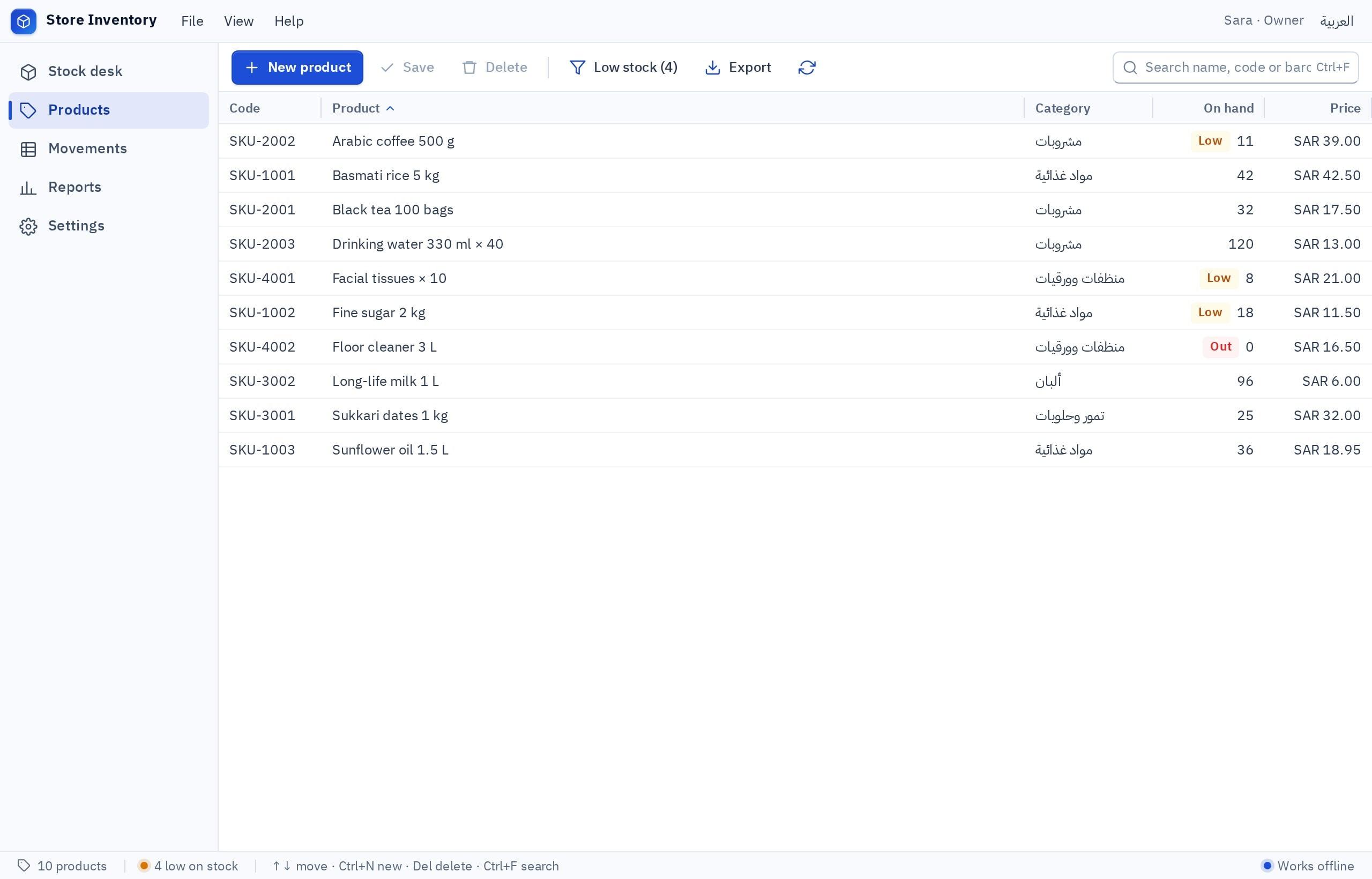
Look at the screenshot: each line is a product, and each column is a piece of information about it: name, quantity, price. That is exactly what a table in a database looks like. The program displays it nicely, but behind the screen sits an organized table that keeps everything.
This guide uses one example throughout: a small coffee store you build yourself. You will see tables and relationships, what happens when a customer orders, why an Excel file is not enough, and how to get a database for your app without setting one up.
How is a database different from an Excel sheet?
An Excel sheet looks like a database table, and in shape it is similar. The difference appears when more than one person uses the data, when it grows, or when each user should see only part of it.
- Usually one person edits at a time
- Anyone who opens the file sees everything
- Easy to type text into a number column
- Several copies, and nobody knows which is latest
- Thousands of users read and write together
- Each user sees only what they are allowed to
- Each column has a fixed type: number, date or text
- One correct copy that everyone reads from
Excel is great for analysis and solo work. But when your business runs on a file passed between staff on WhatsApp, you need an app with a database. If your data lives in Excel today, Excel to App turns your file into a system with screens and roles, with your rows in it from the first moment.
What are tables, rows and columns?
A database is made of tables, and each table holds one kind of thing. The coffee store needs at least three: products, customers and orders. Inside each table:
- A column describes one kind of information: product name, price, quantity in stock. Each column has a fixed type, so the price column accepts only numbers.
- A row is one complete record: one product with all its information, or one order.
- An ID is a unique number for each row that never repeats, used to point to that row from anywhere else.
Your products table might look like this:
| ID | Name | Price | Quantity | On sale |
|---|---|---|---|---|
| 1 | Ethiopian coffee 250 g | 65 | 40 | Yes |
| 2 | Colombian coffee 250 g | 60 | 3 | Yes |
| 3 | Yemeni coffee 250 g | 90 | 0 | No |
The shape of the tables, their columns and types is called the data schema. It is like a house plan before building: changing it later affects everything that depends on it, so it deserves thought. The details are in how to design your app's database.
How do tables connect to each other?
This is where a database shows its real power. An order needs to know who the customer is and which products it contains. The wrong way is to copy the customer's name, mobile and address into every order. The right way is for the order to store only the customer ID, so the app looks up the rest in the customers table.
- 1Customers table
Each customer has an ID, name, mobile and address, saved once.
- 2Orders table
Each order has an ID, the ID of its customer, the date, the status and the total.
- 3Order items table
Each line links an order to a product: order ID, product ID, quantity and the price at the time of purchase.
- 4Products table
Name, current price and quantity in stock, as in the previous section.
Thanks to these links, a customer who changes their mobile number changes it in one place, and it is correct on every order. You can also ask questions like "What was the best-selling product this month?" and get the answer instantly.
What happens in the database when a customer orders?
Let us follow one order in the coffee store, from the button press to the owner's dashboard:
- Step 1Showing products
The customer opens the store; the app reads the products table and shows only what is on sale.
- Step 2Placing the order
They press "Place order"; a new row is created in the orders table with their customer ID and the status "New".
- Step 3Saving the items
A row is added to the order items table for each product in the cart, with quantity and price.
- Step 4Updating stock
Each product's quantity drops. If it reaches zero, the product stops being offered.
- Step 5The owner's dashboard
The owner opens the dashboard; the app reads new orders and shows them with the customer's name and address.
Who can see the data, and how is it protected?
Your store's database holds customers' phone numbers, addresses and orders. Protecting it is not optional: customers see only their own orders, staff see what their job needs, the owner sees everything. These permissions are enforced on the server, not just on screen, so nobody can bypass them.
The last question matters in our region, where some businesses prefer their data to stay in the Middle East. See hosting in Fanann and the trust page.
How do I get a database for my app without setting one up?
Traditionally you would choose a database, rent a server, set it up, design its tables, write the code that reads and writes, and arrange backups. In Fanann the database comes ready with your app: you describe what the app does, and the tables and relationships are designed and shown in the plan for you to review before building.
I want a coffee store in English and Arabic. I need: products with name, description, price, quantity and photo; customers who sign in with a mobile number; orders with the statuses "New", "Out for delivery" and "Done", where each order holds several products with quantity and the price at purchase time. When an order is placed, stock drops, and at zero the buy button disappears. Customers see only their own orders; the owner sees all orders and a monthly sales report. Before building, show me the tables, their columns and how they connect, in plain words.
Try it in FanannPick the one that sounds like you to see the advice.
The database lives in the cloud, shared by all users, with login and permissions. This is the normal setup for any store or booking system.
Choose a local database: data stays on that PC, the program works offline, and backups are your responsibility.
Choose a cloud database: every PC sees the same records, with internet and sign-in required.
How do I learn from my own app's database?
Once your app is built, you have the best study material possible: a real database for a business you know. Try these exercises:
- Ask Neo: "Which tables does my app have? How is an order linked to a product?" Ask for an explanation using your own data.
- Add a column: ask for "weight" or "origin" on products, then open the code and find every place that changed.
- Ask your data a question: request a report of the five best-selling products and notice where the numbers come from.
- Test permissions: sign in as a customer and try to open the owner's dashboard, or let the QA Engineer try it and send you a report.
A beautiful app on a messy database is like an elegant shop with a stockroom nobody can find anything in.
To complete the picture, read frontend vs backend to see who talks to the database, and how login works to see how the app knows who you are.
Key takeaways
- A database is the app's memory: without it, everything is forgotten when the page closes.
- Data is organized in tables: columns describe the kind of information, and each row is one record.
- The real power is in relationships: an order points to the customer and products instead of copying them.
- Unlike Excel: many users at once, permissions, and protection against mistakes and duplicates.
- The fastest way to understand it is to build a small app and ask: which tables does it have, and how do they connect?
Frequently asked questions
What is a database in simple terms?
Does every website need a database?
Can I use Excel instead of a database?
Do I need to learn a programming language to work with a database?
Where is my app's data stored in Fanann?
What happens to my data if I export my project?
Ask your AI assistant about this
Copy this prompt into the AI assistant you use, then add the details of your own case.
I am reading this guide: “What is a database? Explained through your own store app” https://fanann.com/en/blog/what-is-a-database-explained/ My question: what is a database Use that page as a source and explain the answer step by step for my situation, tell me what to check before I start, and cite the page link.