A cashier program for a shop or café in Qatar should sell in seconds by barcode or quick buttons, print a receipt in Qatari riyals with two decimals, record how each sale was paid (local debit card, credit card, Apple Pay or cash), reduce stock with every sale and close the drawer at the end of each shift. Qatar had no VAT at the time of writing, so keep a tax line you can switch on later and ask your accountant. The most practical route is to describe your counter in Fanann and install your own program on Windows 10 or 11.
- cashier program Qatar
- POS system for a café in Doha
- best cashier software for a small shop in Qatar
- cashier program for PC that works offline
- how to make my own POS program for my shop
What does a cashier program need in a shop or café in Qatar?
Picture a small café near Souq Waqif at nine in the evening: a queue ordering karak, a delivery rider waiting, a phone order from West Bay. The cashier has seconds per order, and at closing the owner wants to know what was sold, how it was paid and what is running low.
 Illustration
A cashier program does that work: it records each sale, prints the receipt, follows the cash drawer and gives you a report you can trust. What makes it right for Qatar are the local details: the riyal, the way customers pay, two languages at the counter, and staff who often work in English while customers order in Arabic.
- Currency
- Qatari riyal (QAR), two decimals
- Tax
- No VAT at the time of writing
- Payment
- Local debit cards, credit cards, Apple Pay, cash
- Language
- Arabic and English on screen and receipt
- Device
- A Windows 10 or 11 PC at the counter
What should a cashier receipt in Qatar show?
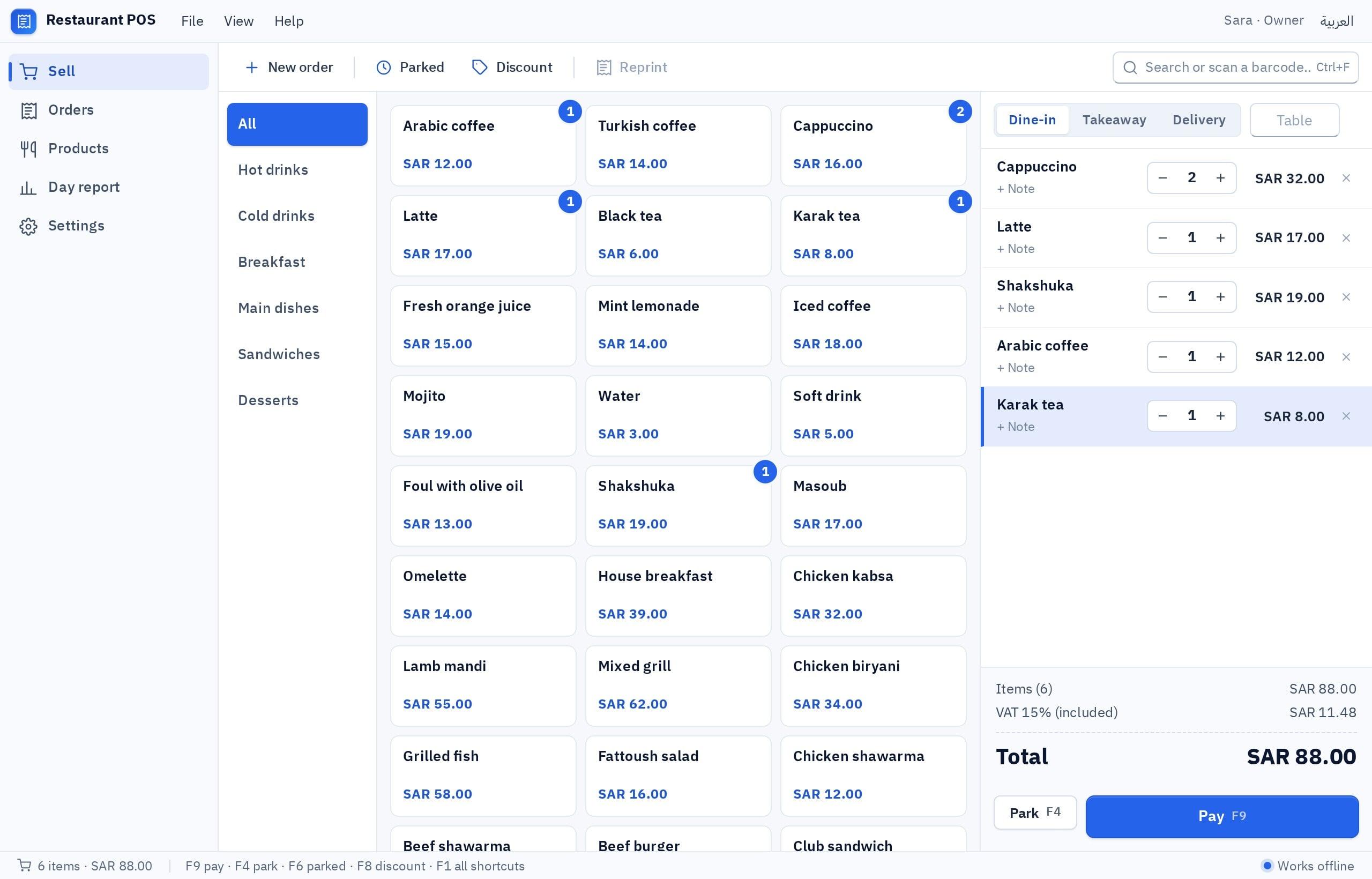
Customers read the receipt, and so will you when you check a disputed sale weeks later. A practical one carries:
| Detail | Why it matters |
|---|---|
| Business name, branch and phone | The customer knows who to call; you know which branch made the sale |
| Receipt number, date and time | A sequence that never repeats, so no sale disappears |
| Items, quantity and price | In Arabic, English or both, as your customers prefer |
| Discount on its own line | So the report shows how much you gave away |
| Total in riyals | Two decimals, such as QAR 18.50 |
| Payment method | Debit card, credit card, Apple Pay or cash, for the daily match |
| A short thank-you line | Your opening hours or Instagram account, if you like |
How does the program handle cash, cards and Apple Pay?
Most customers in Qatar pay by card or phone, using local debit cards on the national network, international credit cards or Apple Pay, while cash is still common at small counters. The payment itself happens on the card terminal from your bank; the cashier program is where you record it and follow it.
- Choosing the method: the cashier picks debit card, credit card, Apple Pay or cash with one tap before closing the sale. Split payments, part cash and part card, are recorded as two lines.
- Cash and change: the program shows the change due, and the drawer report compares what should be in the drawer with what was counted.
- Shift opening and closing: an opening float in the morning, and at the end of the shift a summary by payment method and by cashier.
- Refunds and voids: a refund needs a reason and, if you want, the manager's approval, so the report shows every reversal.
What does each kind of business in Qatar need from its cashier?
| Business | How it sells | What the program must do well |
|---|---|---|
| Café or karak shop | Many small orders, fast | Quick buttons by category, sizes and add-ons, a kitchen or bar slip |
| Restaurant with delivery apps | Counter, phone and app orders | An order source on each sale and a daily report by source |
| Grocery or baqala | Many items by barcode | Fast scanning, sale by piece or carton, credit for regular customers |
| Perfume, oud or gifts shop | Fewer, higher-value items | Gift wrap option, customer phone number, exchanges |
| Phone and accessories shop | Devices with serial numbers | Serial number and warranty period on the receipt |
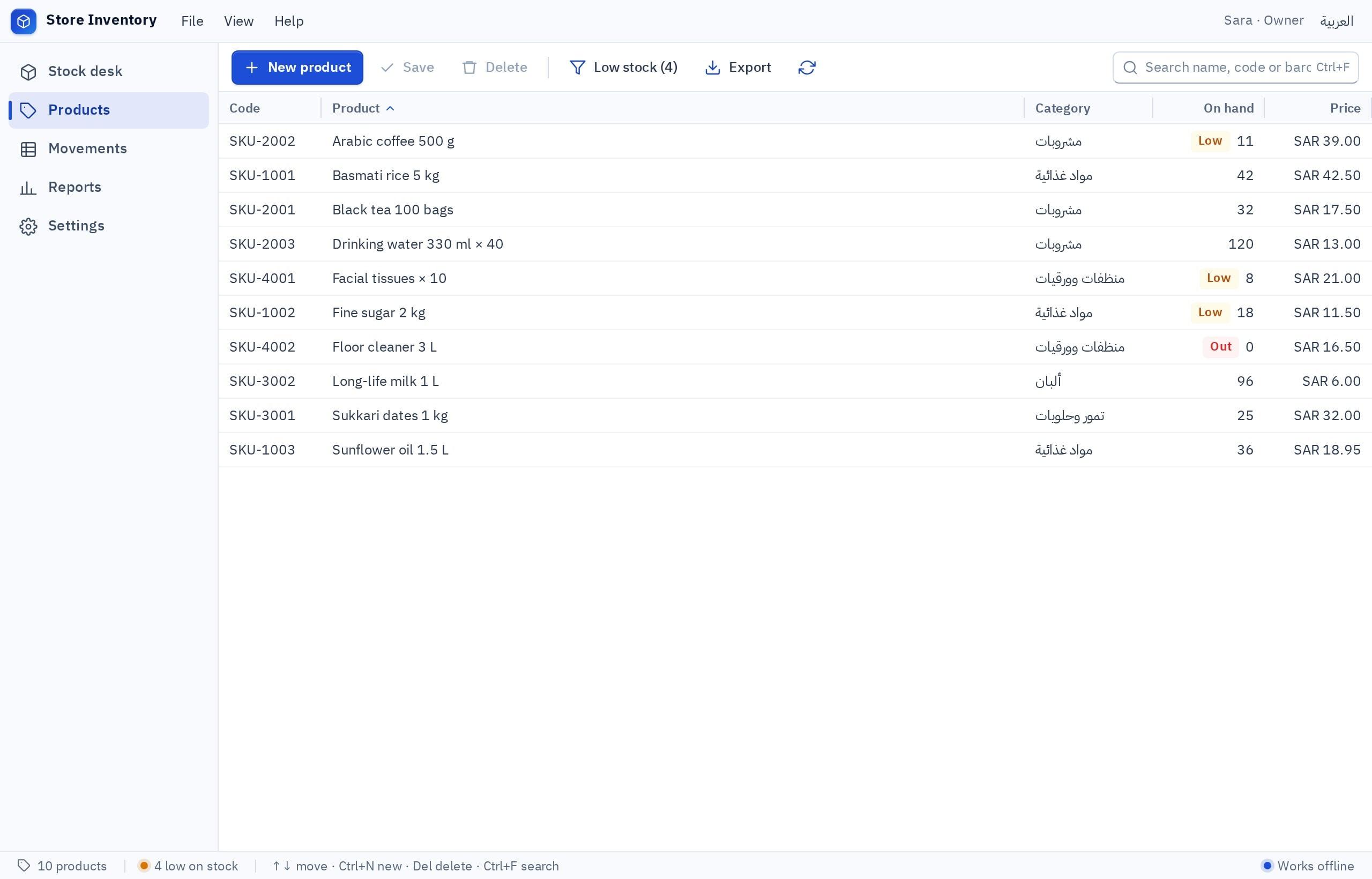
Behind the counter, the same program should follow stock: goods received from suppliers raise quantities, every sale lowers them, and an item below its minimum shows up before the shelf is empty.
If you also issue A4 invoices to companies, see invoice and accounting software in Qatar, or ask for an invoices screen inside the same program.
Which devices work with the cashier at the counter?
No special hardware is needed. A Windows PC at the counter, with a few devices, covers most shops:
| Device | Practical note |
|---|---|
| Windows PC | Windows 10 or 11, 64-bit. Mac, Linux and older 32-bit machines are not supported |
| Barcode scanner | Most USB scanners type like a keyboard, and those work directly |
| Receipt printer | Printing goes through the printers installed in Windows; test your model before opening day |
| Cash drawer | Usually connected to the receipt printer; check that it opens with your setup |
| Card terminal | From your bank, separate from the program |
A wider guide to screens, devices and setup is in a cashier program for your PC.
A ready system, a free program or your own cashier?
You will find ready systems with monthly subscriptions and free downloads. Free often means a time-limited trial or no support. Ready systems work, but you adapt your shop to their screens as you grow.
Pick the one that sounds like you to see the advice.
Build a café cashier in Fanann with quick buttons for your menu, sizes and add-ons, local data on the counter PC, and a shift report by payment method.
Start from the Fanann cashier template, import your item list from Excel with barcodes and prices in riyals, and turn on minimum-level alerts.
Build the same program with cloud data, so the Lusail and Al Rayyan branches see the same items and you see sales from both in one report.
- Fixed screens you get used to
- Changes when the vendor decides
- A subscription that grows with devices and branches
- Screens and receipt made for your menu or shelves
- Works with no internet on local data
- You change it by describing what you want
- The project is yours and you can export it
What each plan includes is listed on the pricing page, and you can start free to see your cashier running before you decide.
One counter, or branches that share sales and stock?
For one counter, local data is the simple choice: everything lives on the shop PC and sales keep going when the internet drops. If you run a branch in Doha and another in Al Wakrah, or a second counter on the same floor, choose cloud data: each employee signs in and everyone works on the same items and sales, as long as there is an internet connection.
How do I build a cashier program for my shop in Fanann?
Open the POS software builder, start from the restaurant cashier in the Windows templates or from your own description in Arabic or English, typed or spoken. You see the program running in a Windows-style window in your browser, change what you want by chat, choose where the data lives, then download an installer for Windows 10 or 11.
I want a cashier program for a café in Doha, in Arabic and English, with Arabic right to left. Quick buttons by category: hot drinks, cold drinks, karak, sandwiches, sweets. Each item can have a size (small, medium, large) and add-ons with their own price. Prices in Qatari riyals with two decimals. Payment methods: debit card, credit card, Apple Pay and cash, with split payment and change due. Print a receipt with the café name, receipt number, date, items and total, and a separate slip for the bar. Shift opening and closing with a report by payment method and by cashier. Stock for milk, cups and syrups with a minimum-level alert. A tax rate setting that is off for now. Local data on one PC with a daily backup.
Try it in FanannWhat should I test before relying on it at rush hour?
More guides for the local market are in the Qatar market guide and on the Doha page.
A good cashier is the one nobody notices at rush hour and everyone trusts at closing.
Key takeaways
- Prices and totals in Qatari riyals with two decimals, the same on screen, receipt and reports.
- Card and Apple Pay payments are taken on the bank terminal; the program records the method and you reconcile the totals with the settlement slip every day.
- Qatar had no VAT at the time of writing: keep a switchable tax line and confirm your situation with an accountant.
- One counter works well on local data with no internet; several branches need shared cloud data.
- Building your own cashier in Fanann gives you screens and a receipt made for your shop, on a program you install on Windows.
Frequently asked questions
What is the best cashier program for a shop in Qatar?
Is there a free cashier program for a PC?
Does the cashier program connect to the card terminal?
Do receipts in Qatar need VAT?
Does it work without internet?
Can I use it on a Mac or an Android tablet?
Ask your AI assistant about this
Copy this prompt into the AI assistant you use, then add the details of your own case.
I am reading this guide: “A cashier program for shops and cafés in Qatar” https://fanann.com/en/blog/cashier-program-qatar/ My question: cashier program Qatar Use that page as a source and explain the answer step by step for my situation, tell me what to check before I start, and cite the page link.