Yes, free cashier programs for PCs exist, but free usually means one of four things: a time-limited trial, a version capped on items, invoices or devices, a program given away with no support or updates, or software that is free in exchange for hardware or a payment contract. Before choosing, check three things: that your data can be exported and backed up, that the invoice meets your country's rules, and that it prints and runs on your own devices. The stronger route: build a cashier around your shop in Fanann, try it before committing, and own the program and its data.
- free cashier program for pc
- completely free cashier software
- cashier system for small shop
- restaurant cashier program
- best free pos software
Is there really such a thing as free cashier software?
Yes, free cashier programs exist, but most are free with conditions: a trial period, usage limits, or no support and updates. A good free program sells, prints and stores your invoices today, and lets you take all your data with you tomorrow if you decide to move.
"Completely free cashier program" is one of the most common things shop owners search for, and that makes sense: a new shop cannot absorb another monthly fee. But a cashier is not an ordinary program; it is where all your income is recorded. So this guide explains the kinds of free, what you sometimes give up in return, and what you really need before you download anything.
What kinds of free cashier software are there?
The word free covers very different models. Know which one you are looking at before you enter your first item:
| Model | What you get | What to watch |
|---|---|---|
| Free trial | The full program for a limited period | What happens to your data when the trial ends and you do not subscribe? |
| Free version with limits | Ongoing use with capped items, invoices or devices | Will the limits fit your shop in six months, not just today? |
| Free download | A PC program with no subscription | Download source, updates, support and backups |
| Free with hardware or a contract | The program bundled with a device or a payment provider deal | Contract length, transaction fees, and whether your data leaves with you |
| Build your own | A program shaped to your shop that you try before committing | Your time describing and testing, and the tool cost depending on your plan |
What is the hidden cost of a free cashier program?
Free can look fine on download day. But these are the costs that show up later:
- Sales history locked inside: without a full export, moving later means starting from zero.
- No support when you need it: the program stops on a Thursday night and nobody answers.
- No updates: the tax rate or required invoice layout changes, and the program does not.
- No backups: a failed hard drive means losing every invoice and item.
- Limits that appear suddenly: you hit the item or invoice cap in the middle of the season.
- Untrusted download sources: files from unknown sites can carry malware onto the very computer your shop's money runs through.
What does a shop's cashier system really need?
Before comparing programs, know the minimum you will not give up. This list works for a grocery, a clothing shop or a small café:
If anything on this list is missing, the program may be free but it will not be cheap. For the full detail on cashier screens, printers and barcode scanners, see cashier program for PC.
What else does a restaurant cashier program need?
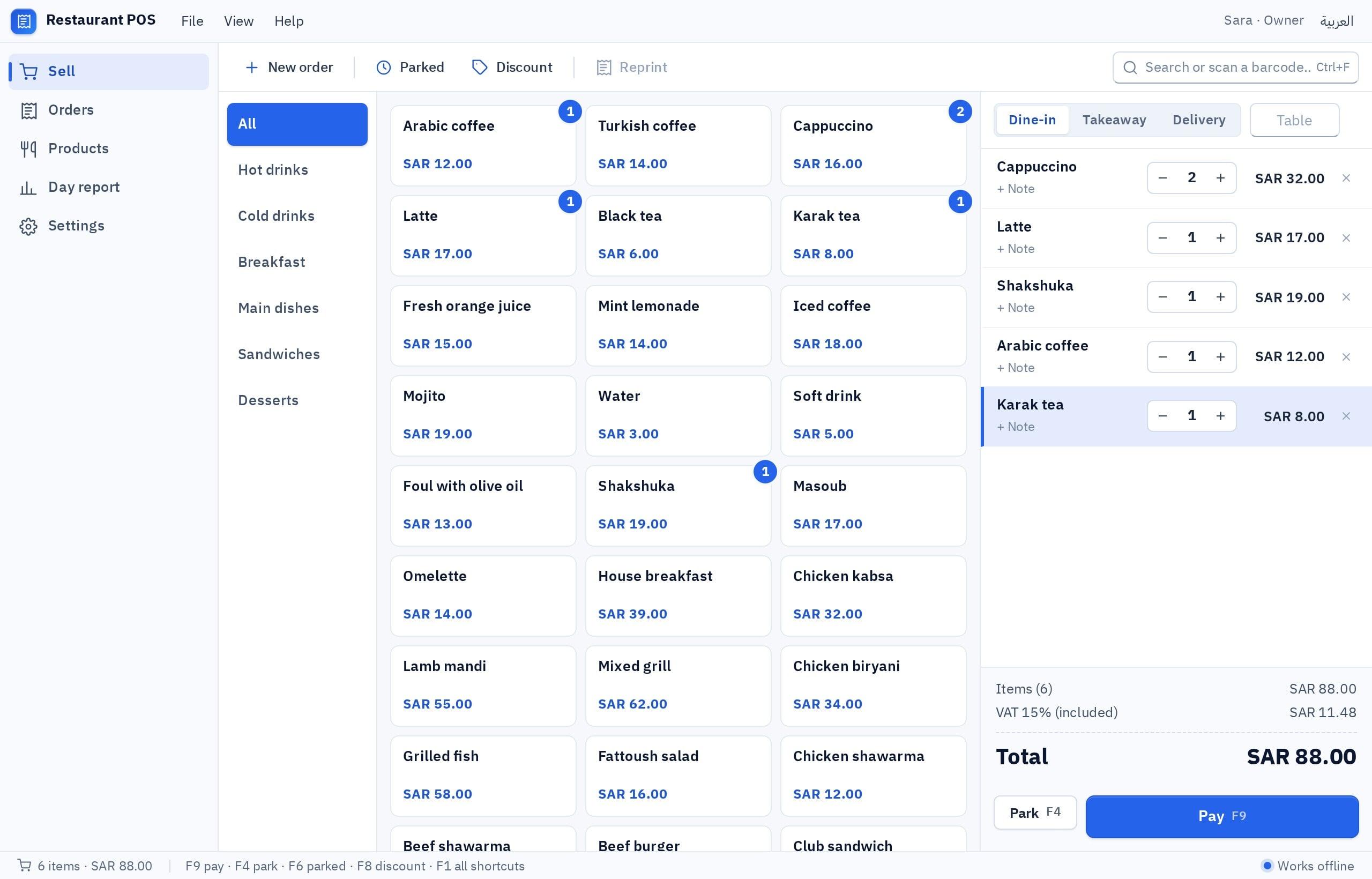
A restaurant is not a shop with fixed items. Orders change, get modified and split, and pass through the kitchen before reaching the customer. So a restaurant POS needs features general free programs rarely include:
| Need | Why it matters in a restaurant |
|---|---|
| Order type: dine-in, takeaway, delivery | Each type has a different price, fee or kitchen route |
| Tables | An open order per table that grows until payment |
| Modifiers and notes | No onion, extra sauce, large size, without becoming separate items |
| Kitchen orders | A printed ticket or a screen showing new orders the moment they are sent |
| Split bills | Friends at one table each pay their share |
| Item reports | What sells most at lunch and dinner, so you can adjust the menu |
If your restaurant needs a kitchen screen, tables and modifiers, the guide to building a restaurant POS walks through it step by step.
Free cashier program for PC: what should you check before downloading?
When a program looks right, give it an hour of testing before you enter all your items. These questions save weeks of regret:
- Where is the data stored? On the PC itself, so it works offline, or in the cloud, so you see it anywhere? Each has its strengths; the detail is in local or cloud database.
- Does the invoice suit your country? Saudi Arabia, for example, has e-invoicing requirements, and the UAE and Egypt have tax invoice requirements. They differ and evolve, so confirm them with the official source and never assume a free program meets them.
- Does it print on your printer? Print ten receipts with long Arabic names and make sure nothing is cut off.
- Does it read barcodes? Most scanners act like a keyboard, but test twenty real products.
- Can you export everything? Export items and invoices to a file and open it before relying on the program.
- Who answers if it stops? A support line, an active forum, or nobody. Know the answer before the busy season.
Should I build my own cashier system instead of using a free one?
Ready-made software, free or paid, makes your shop fit its mold. A cashier built around your shop in Fanann fits how you already sell, runs offline as a Windows program, has no per-till subscription, and stays yours. Where the law requires certified e-invoicing, connect that step and Fanann runs everything else. The card terminal stays separate either way:
Pick the one that sounds like you to see the advice.
Start from Fanann's cashier template on one PC with a local database: sales, receipt, drawer close and backup, with no multi-branch fees.
Selling by weight, bundles, deposits or rentals? A program shaped to you saves working around a template that does not fit.
Build a cashier in Fanann that matches your menu and kitchen: tables, modifiers, kitchen tickets and split bills, the parts free versions rarely complete.
Connect the certified e-invoicing step your country requires, and let your Fanann cashier run everything else. Verify the requirements with the official source.
In Fanann's POS software builder you describe your shop in Arabic, watch the cashier run inside a Windows-style window, choose a local database for one offline PC or a cloud database for several tills, then download an installer for Windows 10 or 11. You can start free; what each plan covers is on the pricing page.
I want a cashier program for a small shawarma restaurant, in Arabic, right to left. Order types: dine-in with a table number, takeaway, delivery with a fixed fee. Categories: shawarma, meals, starters, drinks, with large buttons. Modifiers per item (no garlic, spicy, extra cheese at a price). Print a kitchen ticket on send and a customer receipt on payment, on an 80 mm printer. Tax on its own line. Pay by cash with change, card, or mixed, and split the bill. Shifts with open, close and cash count. A cashier and a supervisor; voids for the supervisor with a reason. A daily report by item and payment method, and export invoices to a spreadsheet file.
Try it in FanannHow do you move off a free program without losing your data?
Whether you move to another program or build your own, a safe move follows the same steps:
- 1Export everything
Items with prices and barcodes, customers if any, and old invoices, to spreadsheet files.
- 2Keep the old one read-only
Do not delete the old program right away. You will need it to reprint an invoice or check a return.
- 3Import and review
Load items into the new system and check a sample: prices, tax and barcodes.
- 4Run both for a week
Record sales in the new one and compare the daily report with what you are used to until you trust the numbers.
- 5Back up from day one
Make saving a backup the last step of closing every day.
If your invoices need more organization than a cashier receipt, continue with the invoice software guide, or read cashier program in Saudi Arabia if your shop is in the Kingdom.
Truly free cashier software is the one you can leave with all your data.
Key takeaways
- Always ask: free until when, within which limits, and who helps me if it stops working?
- The most dangerous hidden cost of free POS software is losing your sales history or being unable to export it.
- Tax invoice and e-invoicing rules differ between Saudi Arabia, the UAE and Egypt, so confirm them with the official source.
- A restaurant cashier needs what a shop does not: tables, modifiers, split bills and kitchen orders.
- Run any new program for a week alongside your current method before relying on it.
Frequently asked questions
Is there a completely free cashier program with no catch?
What is the best free cashier program for PC?
Does free cashier software issue tax invoices?
What is the difference between a cashier system and a cashier program?
Is there free restaurant cashier software?
Does a cashier program work without internet?
Can I make a cashier program for my shop myself?
Ask your AI assistant about this
Copy this prompt into the AI assistant you use, then add the details of your own case.
I am reading this guide: “Free cashier program: what do you actually need before choosing?” https://fanann.com/en/blog/free-cashier-program/ My question: free cashier program for pc Use that page as a source and explain the answer step by step for my situation, tell me what to check before I start, and cite the page link.