A cashier program for a shop in Egypt has to sell fast by tapping or scanning a barcode, total in Egyptian pounds, record how each sale was paid (cash, card, mobile wallet or on a customer's credit account), print a receipt and close the drawer with a daily report. The fastest way to get one that fits your shop is to describe it in Fanann, choose a local (offline) or cloud database, and download an installer for Windows 10 or 11. If your business falls under the e-receipt system, check with your accountant and the tax authority.
- cashier program for shops in Egypt
- POS software for supermarket Egypt
- how to make a cashier program for my shop
- cashier software that works offline
- POS system with credit customer accounts
What does a cashier program for a shop in Egypt need to do?
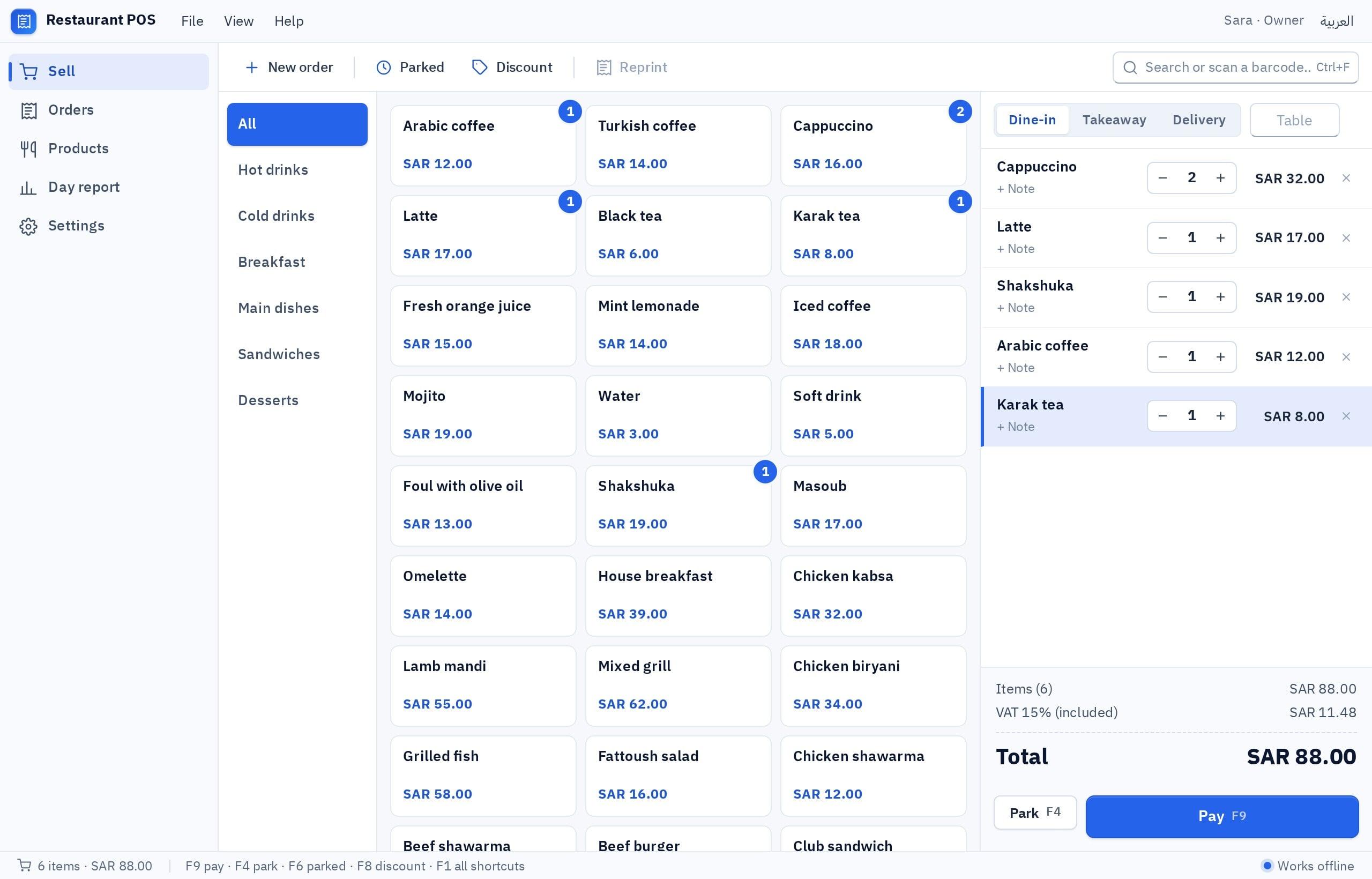
The cashier screen is where your staff stand all day. Its first job is to sell quickly without holding up the queue: tap an item or scan its barcode, see the price in Egyptian pounds, apply any discount, record the payment and print the receipt.
 Illustration
What makes a shop in Egypt different shows up in the details. A customer pays part in cash and part from a wallet, or takes goods on credit and settles at the end of the month. A program that misses these habits pushes staff back to a side notebook, where numbers get lost.
- Currency
- Egyptian pounds, with two decimals for piasters
- Payment methods
- Cash, card, mobile wallet, instant transfer, credit
- Computer
- Windows 10 or 11, 64-bit
- Works offline
- Yes, with the local database
- Printing
- Through the printers installed in Windows
What does each kind of shop need from a cashier program?
No single cashier program fits every shop equally well. A supermarket cares about barcodes and speed, a café about an open order per table, a clothing shop about sizes, colors and exchanges. Write your needs down first.
| Kind of shop | What matters most at the till | The detail people forget |
|---|---|---|
| Supermarket or grocery | Fast barcode selling, items sold by weight, low-stock alerts | Items without a barcode need quick buttons on screen |
| Beauty and personal care | Many similar items, expiry dates, search by name | An alert before an item expires |
| Café or small restaurant | An open order per table, add-ons, takeaway | Kitchen tickets kept separate from the customer receipt |
| Clothing and shoes | Size and color per item, exchanges and returns | Exchange with a price difference without voiding the original sale |
| Phones and accessories | Serial numbers, warranty, credit | Warranty details on the receipt |
How does the program record cash, cards, wallets and credit?
The question every shop owner asks at closing time is why the drawer does not match the sales. Usually the program recorded the amount but not how it was paid. Make every sale carry its payment method.
- Cash: the program works out the change from the amount received.
- Card: the terminal stays separate; mark the sale as card to match it with the terminal report.
- Mobile wallet or instant transfer: record the method and a reference so transfers are easy to check.
- Split payment: part cash and part wallet on one receipt.
- Credit: the sale goes on the customer's account and every partial payment is dated.
- Fawry: for phone or online orders collected through Fawry, record it as its own method.
If sales are part of a bigger picture with suppliers, purchases and stock balances, read accounting and inventory software for shops in Egypt
What does a working day at the till look like?
- OpeningOpening float
The cashier records the change in the drawer under their name before the first sale.
- During the daySelling and payment
Every sale is saved with its items and payment method, and stock goes down automatically.
- Rush hourParked sales
A customer forgot something? Park the sale and serve the next person in line.
- Shift changeClose the shift
A report of cash, card, wallet and credit per cashier before handing over.
- ClosingDay report
Sales, best sellers and the gap between the drawer and what it should hold, plus a backup.
This routine is what lets a shop owner relax while away: you know who sold, how much and how it was paid, without standing at the counter yourself.
Will it work with my receipt printer and barcode scanner?
It depends on your device. The program prints through the printers installed in Windows, so if your receipt printer appears in the Windows printer list and prints a test page, it will print receipts. A barcode scanner works when it types the number as if it were a keyboard, as most USB scanners do.
| Device | What to check | Note |
|---|---|---|
| Thermal receipt printer | It appears in Windows printers and prints a test page | Check paper width and Arabic text on the receipt |
| Barcode scanner | It types the number into a text editor when you scan | Scanners that type like a keyboard fit best |
| Cash drawer | Opens with the printer or by hand | Test how it opens with your specific printer |
| Card terminal | Separate from the program | Record the payment method in the program for matching |
For labels and barcodes on the products themselves, see barcode label printing software.
Does the cashier work without internet, and where is the data kept?
Before you download, Fanann asks where your program's data should live. A local database keeps the data on the shop computer itself: it works offline, on one computer, and you take the backups yourself. A cloud database shares the data between several computers: it needs internet and sign-in.
Pick the one that sounds like you to see the advice.
Choose the local database, and back up daily to a USB stick.
Choose the cloud database so every till sees the same stock and one report.
The cloud database, to see each branch and all branches together.
For the full comparison, read local or cloud data for Windows software.
Ready-made software or a program built around how you sell?
Ready-made programs are designed for an average shop that does not really exist. You may find its credit accounts weak or its report lumping wallets in with cash, and end up adapting to it.
- Fixed screens made for a generic shop
- Changing a field or report means waiting for the vendor
- A recurring subscription, sometimes per computer
- Your data lives in a system you do not control
- Screens that follow how you sell: credit, weight, sizes, tables
- Change any screen with a short description in the chat
- An installer you download onto your shop's computers
- The project is yours and you can export it
That is why we recommend shop owners build their own program in Fanann: it fits your shop from day one and changes when your business does. To start without spending, read free cashier software. What each Fanann plan includes is set out on the pricing page.
How do I build a cashier program for my shop in Fanann?
You do not need to know programming. Write what you want in Arabic or English, or say it out loud, and Fanann starts from the POS software builder or from the restaurant cashier template among the eight ready Windows templates.
- 1Describe your shop and how you sell
Kind of shop, items, payment methods, credit, printer and number of computers.
- 2Watch the program run
It runs inside a Windows-style window in your browser.
- 3Change it by talking
For example: add a discount button.
- 4Choose where data lives and download
Local or cloud, then an installer for Windows 10 or 11, 64-bit, on your shop's computers.
I want a Windows cashier program for a supermarket in Giza, in Arabic, right to left. Prices in Egyptian pounds. Selling by barcode scanner or quick buttons for vegetables, fruit and bread, and items sold by the kilo with the weight typed in. Payment methods: cash with change calculated, card, mobile wallet with a transaction reference, split payment across methods, and credit on the customer's account with a limit per customer and a payment history. Park a sale and resume it later. Discounts by amount or percentage, manager permission only. A thermal receipt with the shop name, address and phone number. Stock goes down with every sale, with an alert when an item runs low. Open and close a shift per cashier, and a daily report that separates cash, card, wallets and credit. Roles: manager and cashier. One-click backup.
Try it in FanannWhat about e-receipts, and what should I test before the first sale?
The Egyptian Tax Authority runs an e-receipt system for sales to consumers and an e-invoice system for sales between businesses. Who is covered and how is set by the authority. A program you build in Fanann organizes your sales and internal receipts, but it is not approved or registered with the authority. The general picture is in e-invoicing in Egypt.
More projects from the capital are on the Cairo page, and the rest of our guides for the Egyptian market are in the Egypt market guide. The general picture is in a cashier program for your PC.
A good cashier program goes unnoticed: staff just sell, and the owner knows where every pound went.
Key takeaways
- Record how every sale was paid (cash, card, wallet or credit); the drawer alone never tells the full story.
- Give every credit customer a balance, a limit and a payment history.
- Printing goes through Windows printers and scanners must type like a keyboard, so test your devices first.
- A local database works offline on one computer; a cloud database connects several tills or branches and needs internet.
- The e-receipt system is set by the tax authority; check with your accountant first.
Frequently asked questions
What is the best cashier program for shops in Egypt?
Does the cashier program work without internet?
Can I record credit sales in the cashier program?
Is the program approved by the tax authority for e-receipts?
Will it run on any computer?
Is the cashier program free in Fanann?
Ask your AI assistant about this
Copy this prompt into the AI assistant you use, then add the details of your own case.
I am reading this guide: “A cashier program for your shop in Egypt, built around how you sell” https://fanann.com/en/blog/cashier-program-egypt/ My question: cashier program for shops in Egypt Use that page as a source and explain the answer step by step for my situation, tell me what to check before I start, and cite the page link.